
ChatGPT is becoming part of everyday life for teenagers.
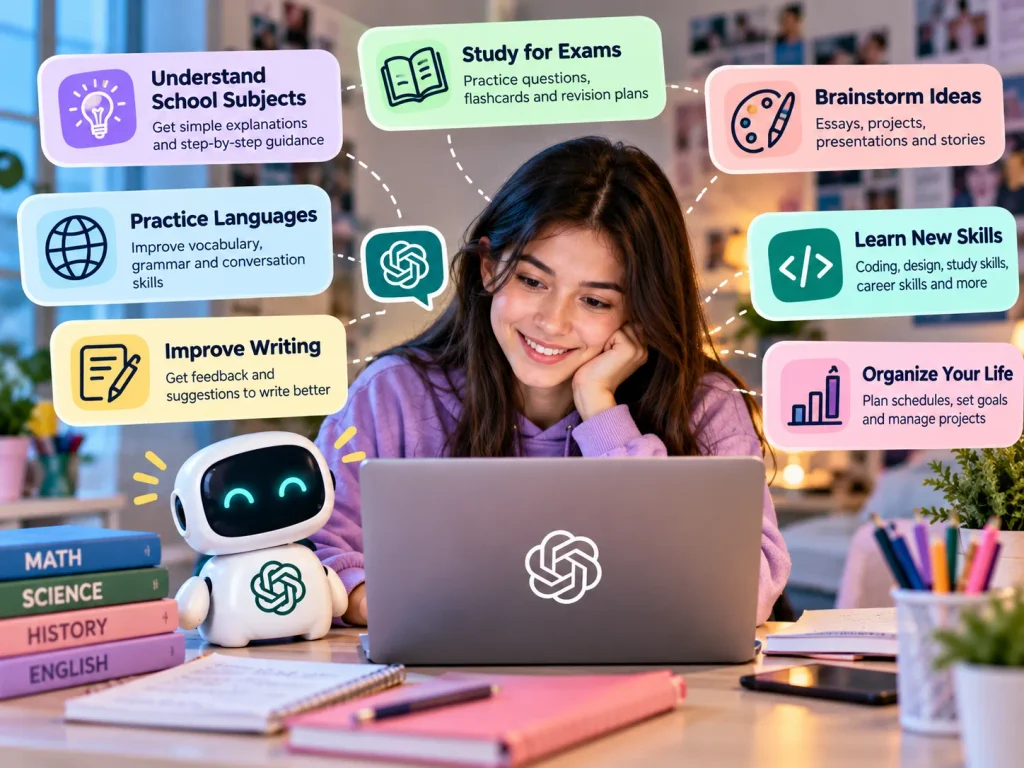
Students can use it to understand a difficult math problem, prepare for an exam, brainstorm a story, practice another language, organize a study schedule, or simply ask a question they don’t know how to answer.
And in 2026, this matters particularly for Gen Alpha.
Using the commonly cited 2010–2024 definition of Generation Alpha, the oldest members of Gen Alpha turn 16 in 2026. That means part of this generation has officially entered the teenage years.
At the same time, ChatGPT itself has changed.
In August 2026, OpenAI began rolling out ChatGPT for Teens, an experience designed for eligible users under 18 with additional learning tools, age-appropriate protections, healthy-use features, and optional parental controls.
So what exactly is ChatGPT for teens? Is it safe? What can teenagers use it for? And what should both Gen Alpha and their parents understand before making AI part of everyday life?
Let’s break it down.
Table of Contents
What Is ChatGPT for Teens?
ChatGPT for Teens is a version of the ChatGPT experience designed for eligible users under 18.
It isn’t simply a completely separate chatbot.
Teen users can still use ChatGPT to:
- Ask questions
- Study
- Brainstorm
- Write
- Create
- Practice skills
- Explore ideas
- Organize projects
- Get everyday assistance
The difference is that teen accounts can receive additional protections and features intended to make the experience more age-appropriate.
According to OpenAI, eligible accounts identified as belonging to someone under 18 can automatically receive the ChatGPT for Teens experience.
This can include stronger protections around sensitive content, learning-focused features, reminders about healthy use, and additional settings that parents and guardians may manage when accounts are linked.
Why ChatGPT for Teens Matters for Gen Alpha
This isn’t only a parenting story.
It’s also a Gen Alpha story.
Generation Alpha is growing up at a time when AI is moving from a futuristic concept to an everyday tool.
Previous generations searched Google when they had a question.
Gen Alpha can ask an AI a question and then continue the conversation.
They can say:
“Explain that more simply.”
“Give me an example.”
“Quiz me.”
“I still don’t understand.”
“Don’t give me the answer. Help me figure it out.”
That conversational experience changes how young people can interact with information.
Our Generation Alpha statistics for 2026 also show just how quickly AI has entered young people’s lives. National research cited in that guide found widespread AI and chatbot use among U.S. children and teenagers.
For Gen Alpha, learning how to use AI responsibly may therefore become as important as learning how to search the web effectively.
How Old Do You Have to Be to Use ChatGPT?
This is one of the most important things parents and young users should understand.
ChatGPT is not intended for children under 13.
Users between 13 and 18 require permission from a parent or legal guardian.
Age requirements can also depend on local laws, so families should always check the current requirements for their country.
For children under the minimum age, independent personal ChatGPT accounts are not appropriate.
In educational settings involving younger children, adults should manage the actual interaction with ChatGPT where required.
How Does ChatGPT Know Someone Is a Teen?
ChatGPT may use age-related information associated with an account to determine whether someone should receive the teen experience.
This can include:
- Account-provided age information
- Verified age
- Age prediction
If an eligible account is identified as belonging to someone under 18, ChatGPT can automatically enable its teen protections.
That means a teenager does not necessarily have to find a hidden setting and manually turn on “teen mode.”
The system may apply the appropriate experience automatically.
Age-prediction technology is not perfect, however.
If an adult is incorrectly placed into the teen experience, age verification may be available to correct it.
What Safety Protections Does ChatGPT for Teens Have?
Teen users receive additional safeguards compared with the standard adult experience.
These protections are intended to reduce exposure to certain sensitive or potentially harmful content.
Areas receiving additional attention include topics such as:
- Graphic violence
- Dangerous activities
- Self-harm
- Eating disorders
- Explicit sexual content
- Harmful viral challenges
- Extreme beauty standards
- Certain sexual, romantic, or violent role-play
One additional setting is Reduce Sensitive Content.
For accounts using the ChatGPT for Teens experience, this protection is enabled by default.
These safeguards are important.
But teenagers and parents should understand something equally important:
No safety system is perfect.
AI safeguards reduce risk. They do not eliminate every possible mistake or inappropriate response.
That is why AI literacy still matters even when safety features are enabled.
What Can Teens Use ChatGPT For?
There are many constructive ways teenagers can use ChatGPT.
1. Understanding School Subjects
A teen can ask ChatGPT to explain a difficult concept at a simpler level.
For example:
“Explain photosynthesis like I’m 14.”
“Help me understand quadratic equations step by step.”
“What is the difference between mitosis and meiosis?”
The best approach is to use AI to understand the subject, rather than simply copying an answer.
Our guide on whether children should use ChatGPT for homework explores this distinction in more detail.
2. Studying for Exams
ChatGPT can turn notes into:
- Practice questions
- Flashcards
- Mini quizzes
- Revision plans
- Mock tests
- Simple explanations
A useful prompt could be:
“Quiz me on this chapter one question at a time. Don’t show me the answer until I try.”
That changes AI from an answer machine into a study partner.
3. Brainstorming
Teens can use ChatGPT to generate ideas for:
- Essays
- Projects
- Presentations
- Stories
- Videos
- School clubs
- Science projects
The student should still make the final decisions and develop the work.
4. Practicing Languages
Conversational AI can be useful for practicing vocabulary, grammar, translations, and everyday conversations.
A teen learning Spanish, for example, could ask ChatGPT to conduct a simple conversation and correct mistakes.
5. Improving Writing
ChatGPT can provide feedback on writing.
Instead of saying:
“Write my essay.”
Try:
“Read my introduction and tell me three ways I could make my argument clearer without rewriting it for me.”
That keeps the student involved in the thinking.
6. Learning New Skills
Teenagers can ask ChatGPT for beginner explanations of:
- Coding
- Graphic design
- Public speaking
- Financial literacy
- Study skills
- Career skills
- Creative writing
Our guide to the best safe AI tools for students in 2026 covers other AI tools that can support learning too.
What Is ChatGPT Study Mode?
One of the most useful features for students is Study Mode.
Instead of immediately producing a final answer, Study Mode can encourage a student to work through a subject step by step.
It may:
- Ask follow-up questions
- Give hints
- Explain concepts
- Check understanding
- Break difficult problems into smaller steps
- Create knowledge checks
- Encourage students to reason through answers
For example, instead of solving a math problem immediately, ChatGPT might guide the student through each stage.
This is closer to tutoring than simple answer generation.
However, students should still remember that ChatGPT can make mistakes.
Important facts should be checked against textbooks, teachers, reliable sources, or other authoritative material.
Can Parents Control a Teen’s ChatGPT Account?
ChatGPT offers optional parental controls.
A parent or guardian can link their ChatGPT account with an eligible teen’s account.
Depending on available settings, parents may be able to manage things such as:
- Quiet Hours
- Study Hours
- Memory
- Voice features
- Image generation
- Sensitive-content settings
- Certain data and privacy preferences
Parents may also receive limited safety notifications in certain high-risk situations.
These controls are designed to help families create boundaries without requiring parents to watch everything their teenager does.
Can Parents Read Their Teen’s ChatGPT Conversations?
No.
Linking parental controls does not give parents access to their teenager’s conversations, complete chat history, or real-time activity.
This is an important distinction.
Parental controls are designed to manage selected settings and provide limited safety features.
They are not designed as a system for parents to secretly read every conversation.
In limited high-risk situations, safety notifications may be sent to a linked parent or guardian. These notifications are designed to share limited information needed to support safety rather than full conversation transcripts.
What Are Study Hours?
Study Hours can help families make ChatGPT more learning-focused during selected periods.
When Study Hours are active, eligible new chats can begin in Study Mode.
This does not necessarily block ChatGPT.
Instead, it encourages the teenager to interact with the AI in a way that supports learning and independent thinking.
For families worried that AI makes homework “too easy,” this can be a useful distinction.
The goal isn’t necessarily:
No AI during homework.
A better goal may be:
Use AI in a way that still requires you to learn.
What Are Quiet Hours?
Quiet Hours allow linked families to set periods when ChatGPT cannot be used.
This can help families create boundaries around technology.
For example, parents and teens might agree on quiet hours during:
- Sleep
- Family time
- Meals
- School hours
- Offline activities
Technology boundaries work best when teenagers understand why they exist.
Healthy AI use is not only about avoiding harmful content.
It is also about making sure technology doesn’t replace sleep, exercise, school responsibilities, hobbies, family interaction, and real-world friendships.
Is ChatGPT Safe for Teens?
There isn’t a useful one-word answer.
ChatGPT includes specific safeguards for teen users, but no AI system should be treated as completely risk-free or always correct.
A teenager can still encounter problems such as:
- Incorrect information
- Invented facts
- Misleading explanations
- Overreliance on AI
- Privacy mistakes
- Academic misuse
- Excessive use
- Inappropriate dependence on AI advice
The safer approach is to combine technical safeguards with AI literacy.
A teenager who understands AI’s limitations is better prepared to question what it produces.
ChatGPT Can Be Wrong—Even When It Sounds Confident
This is one of the most important AI lessons Gen Alpha needs to learn.
ChatGPT can produce an answer that sounds polished, detailed, and completely confident.
And the answer can still be wrong.
AI can:
- Misunderstand questions
- Mix up facts
- Make calculation mistakes
- Invent citations
- Misinterpret context
- Present outdated information
- Produce convincing explanations for incorrect claims
Never assume:
“It sounds professional, so it must be true.”
Good AI literacy for kids and teens includes knowing when and how to verify information.
ChatGPT Shouldn’t Do All Your Homework
Using AI for schoolwork is not automatically cheating.
How it is used matters.
There is a major difference between:
“Explain this concept because I don’t understand it.”
and:
“Write my entire assignment so I can submit it.”
The first can support learning.
The second can replace learning.
Students should also follow their school’s AI policies.
If a teacher says AI cannot be used for a particular assignment, students should respect that rule.
If AI assistance needs to be disclosed, disclose it.
Your final work should still demonstrate your understanding.
Should Teens Share Personal Information With ChatGPT?
Teens should be careful about the information they enter into any AI system.
Avoid unnecessarily sharing things such as:
- Passwords
- Home addresses
- Exact real-time locations
- Financial information
- Private photos
- School schedules
- Sensitive health information
- Deeply personal family information
- Other people’s confidential information
The same rule applies to friends.
Don’t upload someone’s private messages, photos, or personal problems to an AI simply because you want advice.
Their privacy matters too.
ChatGPT Is an AI, Not a Human Friend
This distinction is becoming increasingly important.
ChatGPT can have natural conversations.
It can remember context when relevant features are enabled.
It can respond supportively.
It can help someone think through a problem.
That can sometimes make an AI interaction feel surprisingly personal.
But ChatGPT is still an AI system.
It does not experience friendship, love, sadness, worry, or empathy like a human being.
Our guide to AI companions for kids and Gen Alpha explores this issue in more detail.
For teenagers, a useful rule is:
AI can be someone you talk with, but it shouldn’t replace the people you talk to.
When Should a Teen Talk to a Real Person Instead?
Some situations need human involvement.
Talk to a trusted person when dealing with serious issues involving:
- Mental health
- Personal safety
- Bullying
- Abuse
- Medical problems
- Medication
- Dangerous situations
- Major relationship problems
- Legal issues
- Financial decisions
That person could be a parent, teacher, counselor, doctor, qualified professional, or another trusted adult.
AI can provide information.
It cannot take responsibility for your well-being.
7 Rules for Gen Alpha Using ChatGPT
If you’re a teenager using ChatGPT, remember these seven rules.
1. Think Before You Copy
Don’t submit an AI answer simply because it sounds good.
Understand it first.
2. Check Important Facts
Verify important information using reliable sources.
3. Protect Your Privacy
Don’t tell AI everything about yourself.
4. Keep Thinking for Yourself
Ask AI to help you understand—not to replace your brain.
5. Follow School Rules
Different teachers and schools may have different AI policies.
6. Keep Real People in Your Life
AI can help with questions, but it shouldn’t replace friends, family, teachers, or trusted adults.
7. Ask for Human Help When Something Is Serious
Some problems are too important to leave to a chatbot.
7 Things Parents Should Do
Parents don’t need to become AI experts.
But they should understand how their teenager is using AI.
1. Ask What Your Teen Uses ChatGPT For
Don’t start with:
“Are you cheating with ChatGPT?”
Try:
“Show me something useful you’ve done with ChatGPT.”
You may learn much more.
2. Try ChatGPT Yourself
Ask it questions.
Use Study Mode.
See what it does well and where it makes mistakes.
Understanding the technology makes conversations easier.
3. Discuss AI Privacy
Teenagers should know what information should remain private.
4. Agree on Homework Rules
Decide when AI is acceptable and when independent work is required.
School rules should also be respected.
5. Consider Parental Controls
Families with eligible teen accounts can explore ChatGPT’s parental-control features and decide which settings fit their needs.
6. Talk About AI Relationships
Ask whether your teenager ever talks to AI about personal issues.
The goal isn’t necessarily to punish them for doing so.
It’s to make sure they understand what AI is—and what it isn’t.
7. Keep the Conversation Going
One conversation about AI safety isn’t enough.
Technology changes.
Your teenager’s use will change too.
Ask occasionally:
“What are you using AI for lately?”
That’s often more useful than waiting until something goes wrong.
What Happens When a Teen Turns 18?
ChatGPT’s teen protections are designed for under-18 accounts.
When ChatGPT identifies that an account holder is 18 or older, the account may transition out of the ChatGPT for Teens experience.
Teen-specific protections can then be removed, and the user receives control over the settings available to adult accounts.
If parental controls were linked, that connection can also end as part of the transition.
This reflects an important principle:
As teenagers become adults, responsibility for managing their AI use increasingly shifts to them.
ChatGPT for Teens and the Future of Gen Alpha
ChatGPT for Teens represents something bigger than a new product setting.
It shows how quickly AI is becoming integrated into adolescence.
The oldest Gen Alpha members are now teenagers.
Over the next several years, more of this generation will begin using AI for:
- School
- Creativity
- Coding
- Research
- Communication
- Career exploration
- Productivity
- Personal questions
- Everyday decision-making
The challenge won’t simply be teaching Gen Alpha how to use ChatGPT.
It will be teaching them when to trust it, when to question it, when not to use it, and when another human being should become involved.
That’s why AI literacy matters.
Knowing how to write a clever prompt is useful.
Knowing how to think critically about the answer is much more important.
Frequently Asked Questions About ChatGPT for Teens
What is ChatGPT for Teens?
ChatGPT for Teens is the ChatGPT experience for eligible users identified as under 18. It includes age-appropriate protections, learning-focused tools, healthy-use features, and optional parental controls.
What is the minimum age for ChatGPT?
ChatGPT is not intended for children under 13. Users ages 13–17 require permission from a parent or legal guardian. Local requirements may vary.
Is ChatGPT safe for a 13-year-old?
Eligible 13-year-olds can use ChatGPT with required parental permission and applicable teen protections. However, no AI system is completely risk-free or always accurate. Parents should discuss privacy, fact-checking, healthy use, and school rules with their teen.
Is ChatGPT safe for Gen Alpha?
Older Gen Alpha members who meet ChatGPT’s age requirements can potentially use it for studying, creativity, research, and other tasks. Age-appropriate safeguards help reduce certain risks, but young users still need AI literacy and appropriate adult guidance.
Can parents see their teen’s ChatGPT conversations?
No. Linking parental controls does not allow parents to read a teen’s conversations, complete chat history, or real-time activity.
Does ChatGPT have parental controls?
Yes. Eligible parents and teens can link their accounts through parental controls. Depending on availability, parents can manage selected settings and schedules and may receive limited notifications in certain safety situations.
What is ChatGPT Study Mode?
Study Mode is designed to make ChatGPT more useful for learning. It can provide step-by-step guidance, ask questions, offer hints, check understanding, and encourage students to work through problems rather than simply receiving an answer.
Can teens use ChatGPT for homework?
Yes, when their school allows it and the use follows applicable rules. ChatGPT can help explain concepts, create practice questions, brainstorm, and provide feedback. Students should avoid using it simply to generate assignments they submit as their own work.
Can ChatGPT give teens wrong information?
Yes. ChatGPT can make mistakes, misunderstand questions, or provide inaccurate information while sounding confident. Important information should be verified using reliable sources.
Should teens tell ChatGPT personal information?
Teens should avoid unnecessarily sharing sensitive information such as passwords, home addresses, precise locations, financial details, private photos, health information, or confidential information about other people.
Is ChatGPT an AI companion?
ChatGPT can hold conversational and sometimes personal discussions, but its broader purpose includes learning, productivity, creativity, research, and everyday assistance. Teens should remember that conversational AI is still software and should not replace important human relationships.
Can ChatGPT replace a tutor?
ChatGPT can help explain concepts and practice skills, but it cannot fully replace a qualified teacher or tutor. It can misunderstand a student’s needs or provide incorrect information.
Can ChatGPT replace a therapist?
No. ChatGPT should not be treated as a replacement for qualified mental health care. Serious emotional, mental-health, or safety concerns should involve trusted people and appropriate professionals.
What happens to ChatGPT parental controls when a teen turns 18?
When an account transitions out of the teen experience after being identified as 18 or older, teen protections are removed by default and a linked parental-controls connection ends. The adult account holder then controls their own settings.
What is the best way for Gen Alpha to use ChatGPT?
Use ChatGPT to learn, explore, create, practice, and think—not to replace your own thinking.
Ask questions.
Challenge answers.
Check important facts.
Protect your privacy.
Follow school rules.
And know when it’s time to talk to a real person.
Final Thoughts
ChatGPT is likely to become increasingly normal for Gen Alpha.
For teenagers, that creates enormous possibilities.
A student can have difficult ideas explained in seconds.
They can practice skills whenever they want.
They can brainstorm, code, write, research, create, and explore subjects far beyond the classroom.
But access to powerful AI also creates responsibility.
Gen Alpha needs to understand that AI can be helpful without being perfect, conversational without being human, and confident without always being correct.
Parents don’t need to choose between “AI is amazing” and “AI is dangerous.”
A better approach sits somewhere in the middle.
Learn how the technology works.
Use the available safeguards.
Keep communication open.
Protect personal information.
Encourage independent thinking.
And teach teenagers one rule that will remain useful even as AI changes:
Use AI to become a better thinker—not to avoid thinking.