Artificial intelligence is becoming part of everyday life. It helps recommend videos, answer questions, translate languages, recognize faces, generate images and support learning. Children may use AI without realizing that a system is making decisions behind the screen.
Being able to operate an AI tool is useful, but it is not enough.
People also need to understand what AI can and cannot do, question its answers, protect personal information, recognize bias and decide when using AI is appropriate. These abilities are collectively known as AI literacy.
So, what is AI literacy in simple words?
AI literacy is the knowledge, skills and judgment needed to understand, evaluate and use artificial intelligence safely, critically, ethically and effectively.
An AI-literate person does not have to be a programmer. They should be able to recognize when AI is involved, understand its basic limitations, check its output and remain responsible for the final decision.
This guide explains the meaning of AI literacy, its main skills and how parents and teachers can prepare children to live and learn in an AI-powered world.
What Is AI Literacy?
AI literacy, also called artificial intelligence literacy, is the ability to understand how AI influences digital tools and to make informed decisions about its use.
It includes knowing:
- What artificial intelligence is
- Where AI appears in everyday life
- How AI systems learn from data
- Why AI can make mistakes
- How bias can affect AI results
- What information should remain private
- How to check AI-generated claims
- When AI use should be disclosed
- When a person should not rely on AI
- How to use AI without replacing human judgment
The OECD describes AI literacy as a group of competencies that enables people to evaluate AI critically, communicate and collaborate with it, and use it as a tool at home, online and at work. OECD: Skills in the AI Age
AI literacy is not simply the ability to write an effective prompt. Prompting is one practical skill, but responsible AI use also requires privacy awareness, fact-checking, ethics and critical thinking.
What Is Artificial Intelligence?
Artificial intelligence is a broad term for computer systems designed to perform tasks that usually require aspects of human intelligence.
These tasks may include:
- Recognizing speech
- Identifying objects in images
- Translating languages
- Predicting what a user may want
- Recommending content
- Answering questions
- Generating text
- Producing images, audio or video
- Detecting patterns in large amounts of data
AI does not necessarily think or understand the world as a person does.
Many AI systems analyse data, identify patterns and produce an output based on those patterns. A system may generate an answer that sounds natural and confident without knowing whether the answer is true.
This distinction is one of the most important lessons in AI literacy.
Also, check our guide on Generation Alpha Statistics 2026: United States Data and Trends
What Is Generative AI?
Generative AI is a type of artificial intelligence that creates new content based on instructions from a user.
It can generate:
- Written text
- Images
- Music
- Computer code
- Presentations
- Audio
- Video
- Summaries
- Study questions
The instruction given to an AI system is often called a prompt.
Generative AI tools can support brainstorming, explanation and creativity. They can also produce incorrect facts, invented sources, biased results or inappropriate material.
AI literacy helps users benefit from generative AI while understanding that its output requires human review.
Where Do Children Encounter AI?
Children may associate AI only with chatbots, but artificial intelligence appears in many familiar services.
Examples include:
- Video recommendations
- Search engines
- Voice assistants
- Photo filters
- Face recognition
- Predictive text
- Translation applications
- Online games
- Educational platforms
- Navigation
- Music recommendations
- Content moderation
- Personalized advertisements
- AI chatbots
- Image generators
A child may therefore interact with AI before intentionally opening an AI-labelled application.
Teaching children to recognize these systems helps them understand why different people may see different search results, videos, advertisements or recommendations.
Why Is AI Literacy Important?
AI increasingly influences what people see, create, learn and believe.
Without AI literacy, a person may:
- Accept an incorrect answer as fact
- Share an AI-generated fake image
- Reveal private information to a chatbot
- Use biased output in a school assignment
- Submit AI-generated work without understanding it
- Trust an automated recommendation without questioning it
- Mistake a chatbot’s friendly tone for real human understanding
- Depend on AI instead of developing essential skills
AI literacy does not require people to reject artificial intelligence. It helps them use it with appropriate caution and purpose.
UNESCO’s AI Competency Framework for Students aims to prepare learners as responsible users and co-creators of AI. It organizes student competency around human-centred thinking, AI ethics, AI techniques and applications, and AI-system design. UNESCO AI Competency Framework for Students
What Are the Main AI Literacy Skills?
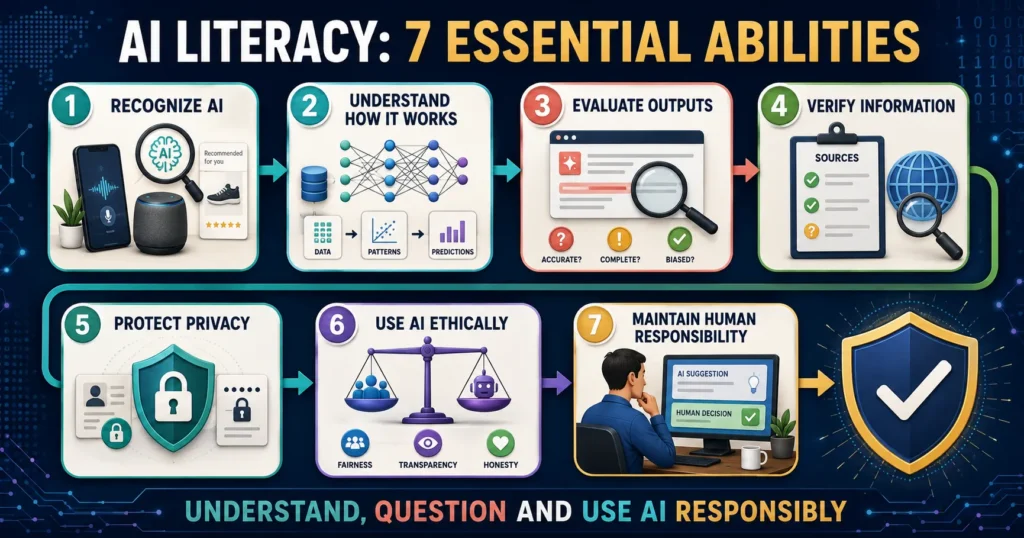
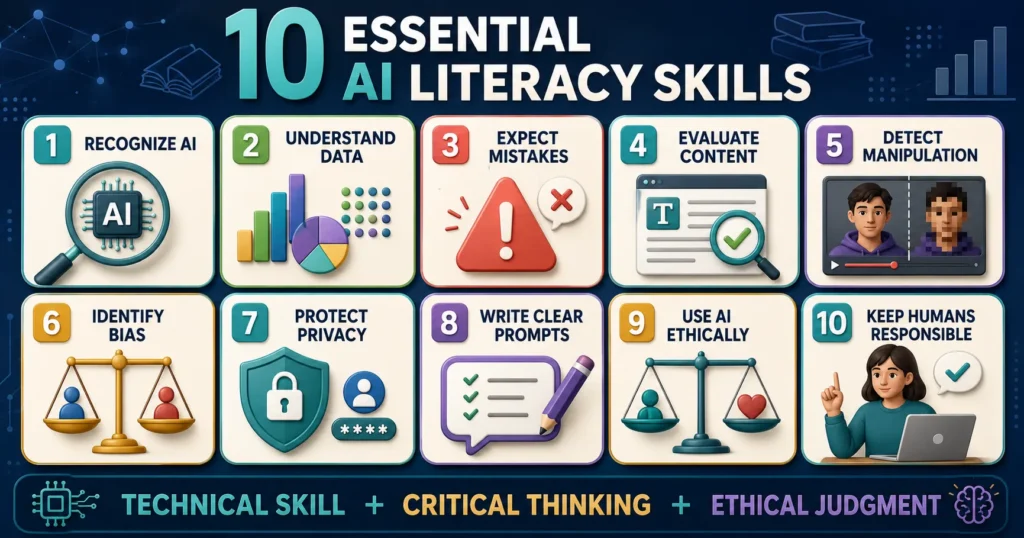
AI literacy combines technical understanding with critical thinking and ethical judgment.
1. Recognizing When AI Is Being Used
The first skill is awareness.
Users should be able to ask:
- Is AI recommending this video?
- Was this image generated or edited?
- Is a chatbot answering me?
- Is an algorithm deciding which post appears first?
- Is AI evaluating my schoolwork?
- Is a platform using my activity to personalize advertisements?
AI is not always visible. An application may use it in the background without placing “AI” in its name.
Recognizing AI’s presence allows users to question its influence.
2. Understanding the Basic Role of Data
AI systems depend on data. Data may be used to train a system, personalize a service or make a prediction.
Children do not need advanced mathematics to understand this basic idea:
An AI system learns patterns from examples, but the quality and limitations of those examples affect its results.
If the data is incomplete, unrepresentative or inaccurate, the result may also be limited.
Users should also understand that the information they enter into a tool may be collected, stored or used according to that service’s policies.
3. Knowing That AI Can Be Wrong
Generative AI can produce false information that sounds convincing.
An AI tool may:
- Invent a date
- Misidentify a person
- Create a false quotation
- Provide a source that does not exist
- misunderstand a question
- Confuse similar events
- Give outdated information
- Make a calculation error
- Present a prediction as a fact
These incorrect but plausible outputs are sometimes called hallucinations.
AI-literate users do not assume that polished language equals accuracy. They verify important information using reliable sources.
4. Evaluating AI-Generated Content
Users should assess AI output rather than accepting or rejecting it automatically.
Useful questions include:
- Does this answer directly address the question?
- Is the information current?
- What evidence supports it?
- Can the source be opened and verified?
- Does another reliable source agree?
- Is an important perspective missing?
- Is the language overly certain?
- Could the result reflect bias?
- Does this require expert review?
The OECD’s planned PISA Media and Artificial Intelligence Literacy assessment focuses on whether students can evaluate the credibility, quality and purpose of digital content and act responsibly. OECD PISA 2029 AI Literacy
5. Recognizing AI-Generated Images and Deepfakes
AI can create or alter realistic images, voices and videos.
Possible warning signs include:
- Unnatural hands or small details
- Inconsistent reflections or shadows
- Unusual facial movement
- Audio that does not match lip movement
- Missing context
- An unknown original source
- An emotional claim designed to encourage immediate sharing
However, visual errors are not reliable proof. As AI improves, generated content may contain no obvious defect.
The better approach is to:
- Identify the original source.
- Check whether trusted organizations report the same event.
- Search for earlier versions of the image.
- Examine the date and context.
- Avoid sharing uncertain material.
UNICEF warns that AI can create realistic images, audio, videos and articles that appear to be authentic. UNICEF Guide to Spotting Misinformation
6. Understanding AI Bias
AI bias occurs when a system produces unfair, distorted or systematically unequal results.
Bias can enter through:
- Unbalanced training data
- Historical discrimination within data
- Design choices
- Poor testing
- Labels created by people
- Assumptions built into a system
- Unequal performance across languages or communities
For example, an AI tool trained mainly on information from one country may not respond as accurately to questions about another country. An image generator may repeatedly associate certain careers with one gender.
Bias does not always mean that a developer intentionally created discrimination. However, the effect can still be harmful.
Users should ask whose experiences are represented, who might be missing and whether the output treats groups fairly.
7. Protecting Privacy
Children should not enter sensitive personal information into an AI tool without appropriate permission.
Information to protect includes:
- Full name
- Home address
- School name
- Phone number
- Passwords
- Live location
- Identification documents
- Medical records
- Private photographs
- Family financial details
- Confidential school information
- Another person’s private data
Privacy policies differ between tools. Parents and schools should review what information an AI service collects, how long it retains data and whether the service is intended for the child’s age.
UNICEF identifies privacy, limited transparency and unpredictable outputs among important concerns surrounding generative AI and children. UNICEF: Generative AI and Children
8. Writing Clear Prompts
A prompt is an instruction or question given to an AI system.
A useful prompt usually includes:
- The task
- Necessary context
- The intended audience
- Desired format
- Relevant limitations
- A request for uncertainty to be identified
For example, instead of writing:
“Explain bridges.”
A student might write:
“Explain how suspension bridges carry loads in simple English for a 12-year-old. Use one everyday example and identify anything that has been simplified.”
Writing a better prompt can improve the response, but it does not guarantee accuracy.
Prompting should always be combined with review and verification.
9. Using AI Ethically
Ethical AI use means considering fairness, honesty, safety and the effect on other people.
A student should ask:
- Does my teacher permit AI for this task?
- Should I disclose that I used it?
- Am I submitting work I do not understand?
- Does this copy another person’s work?
- Am I generating content that could harm someone?
- Am I using another person’s image or voice without consent?
- Could the output reinforce a stereotype?
- Am I respecting copyright and privacy?
AI literacy includes knowing when not to use AI.
10. Maintaining Human Responsibility
AI can assist with a decision, but responsibility remains with people.
A chatbot should not independently decide:
- Whether someone has a serious illness
- Whether a person is guilty of a crime
- Whether a child is safe
- Which emergency response is required
- Whether an important source is trustworthy
- What final grade a student deserves without proper oversight
High-stakes decisions require qualified human judgment and appropriate procedures.
An AI-generated suggestion should not be confused with professional medical, legal, financial or safeguarding advice.
AI Literacy vs Digital Literacy
AI literacy and digital literacy overlap, but they are not identical.
| Digital literacy | AI literacy |
|---|---|
| Using devices and software | Understanding AI-powered systems |
| Searching the internet | Evaluating AI-generated answers |
| Recognizing online scams | Recognizing AI manipulation and deepfakes |
| Protecting accounts | Protecting data entered into AI systems |
| Evaluating websites | Evaluating automated outputs |
| Communicating responsibly online | Collaborating with AI responsibly |
| Understanding digital footprints | Understanding how AI may use data |
Digital literacy remains essential. AI literacy builds upon it by addressing automated decisions, generated content, bias, data and human responsibility.
AI Literacy vs Coding
Coding can help students understand how technology is created, but AI literacy does not require everyone to become a programmer.
A person can be AI-literate without writing code if they can:
- Recognize AI
- Understand its basic operation
- Evaluate output
- Protect privacy
- Identify limitations
- Use it responsibly
- Question its influence
Students who learn coding or machine-learning concepts can develop deeper technical understanding, but critical and ethical skills are necessary for every user.
AI Literacy vs Prompt Engineering
Prompt engineering focuses on giving effective instructions to an AI system.
AI literacy is broader. It includes prompting, but also:
- Fact-checking
- Bias awareness
- Privacy
- Ethics
- Copyright
- Human oversight
- Appropriate disclosure
- Understanding when AI should not be used
A person who can generate an impressive response but cannot identify its false information is not fully AI-literate.
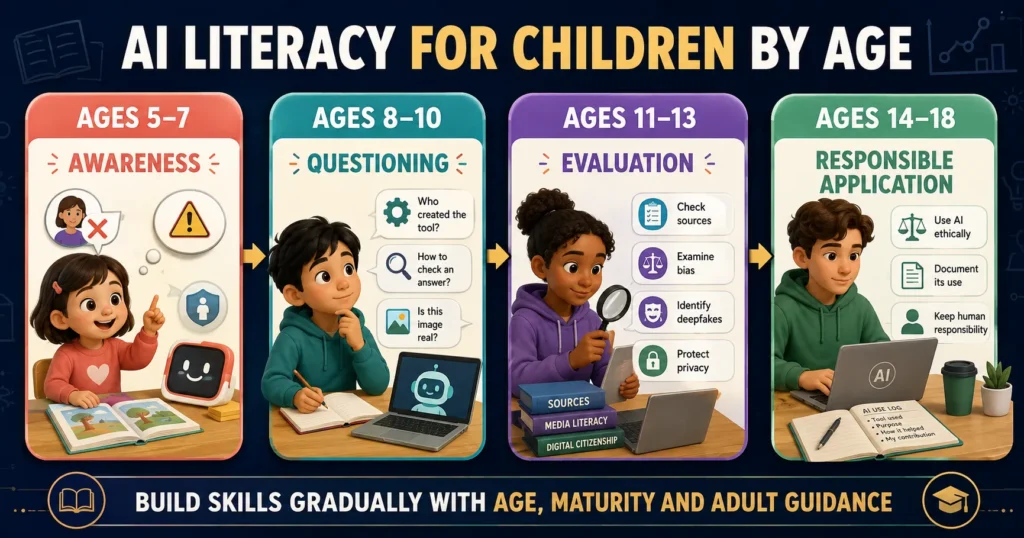
What Does AI Literacy Look Like for Children?
AI literacy should be appropriate to a child’s age and development.
Ages 5–7: Awareness
Young children can learn:
- Some devices use computers to make choices
- A chatbot is not a real person
- AI can make mistakes
- Private information should not be shared
- They should ask an adult before using a new AI tool
- Computer-generated pictures may not show real events
Learning should use simple examples and adult supervision.
Ages 8–10: Questioning
Children can begin asking:
- Who made this tool?
- Where might the answer come from?
- How can I check it?
- Is this image real?
- Why did the application recommend this?
- What information should stay private?
Teachers can compare an AI response with a textbook or trusted website and ask students to find differences.
Ages 11–13: Evaluation
Students can learn about:
- Training data
- Bias
- Hallucinations
- Deepfakes
- Citation checking
- Responsible prompts
- School rules
- Disclosure of AI assistance
- Copyright and consent
They can practise improving AI output rather than merely copying it.
Ages 14–18: Responsible Application
Older students can explore:
- How different AI models work
- Data quality
- Algorithmic decisions
- Ethical trade-offs
- Automation
- AI-generated misinformation
- Copyright questions
- Social impact
- AI in careers
- Designing or testing simple AI systems
They should learn how to document AI use and remain accountable for submitted work.
These age groups are approximate. A child’s experience, school policy and maturity should guide instruction.
How Can Parents Teach AI Literacy at Home?
Parents do not need advanced technical expertise. They can learn alongside their children.
Talk About AI in Everyday Life
Point out examples:
- “Why do you think this video was recommended?”
- “Could this photograph have been generated?”
- “How does the phone recognize a face?”
- “Why might two people receive different search results?”
These discussions help children notice AI rather than treating its decisions as invisible.
Test AI Answers Together
Ask an AI tool a question about a familiar subject.
Then:
- Read the answer.
- Highlight factual claims.
- Check them using reliable sources.
- Look for missing context.
- Discuss how the answer could improve.
This teaches children that AI output is a draft to examine—not an authority to obey.
Establish Privacy Rules
Create a simple family rule:
Never give an AI tool private information, personal images or confidential documents without asking an adult.
Explain that typing something into a chatbot is not always the same as writing it in a private notebook.
Discuss AI-Generated Images
Show children age-appropriate examples of generated images and explain that realistic-looking media may be artificial.
Avoid teaching them that one visual defect always proves an image is fake. Encourage source-checking instead.
Model Honest AI Use
Adults should disclose AI assistance when required, verify important claims and admit uncertainty.
Children learn responsible use when they see adults questioning AI rather than presenting it as magical or always correct.
How Can Teachers Develop AI Literacy?
Teachers can integrate AI literacy across subjects rather than placing it only in computer science.
Language lessons
Students can compare a human-written passage with AI-generated writing, identify unsupported claims and revise weak reasoning.
Science lessons
Students can ask AI to explain a scientific concept, then verify the explanation against trusted sources and identify oversimplification.
History lessons
Students can examine whether an AI response includes multiple perspectives and whether its citations genuinely exist.
Art lessons
Students can discuss creativity, consent, training data, attribution and the difference between inspiration and imitation.
Mathematics lessons
Students can check AI-generated calculations step by step and explain where an error occurred.
Citizenship lessons
Students can explore deepfakes, automated decisions, political misinformation and the social effects of algorithms.
UNESCO’s framework encourages education systems to prepare students as responsible users and co-creators rather than passive consumers of AI.
How Should Students Use AI for Schoolwork?
Students should follow their teacher’s or institution’s rules. Permission can vary by subject and assignment.
When AI is allowed, students might use it to:
- Brainstorm questions
- Request a simpler explanation
- Generate practice quizzes
- Compare viewpoints
- Receive feedback on a draft
- Explore alternative examples
- Check the structure of an argument
- Practise another language
Students should not:
- Submit AI-generated work as entirely their own
- Invent citations
- use AI during prohibited assessments
- Upload another student’s work
- Share confidential information
- Rely on an answer they do not understand
- Use AI to harass, impersonate or deceive
A useful rule is:
Use AI to support thinking, not to avoid thinking.
What Are the Benefits of AI Literacy?
AI-literate children and adults may be better prepared to:
- Use AI productively
- Recognize misinformation
- Protect personal information
- Check unreliable outputs
- Make informed decisions
- Understand automated recommendations
- Communicate clearly with AI tools
- Identify unfair results
- Use AI honestly in education
- Adapt as technology changes
The purpose is not simply career preparation. AI literacy is becoming part of informed participation in society.
What Are the Risks of Poor AI Literacy?
Without adequate understanding, users may:
- Believe fabricated information
- Spread deepfakes
- Expose private data
- Become overly dependent on chatbots
- Make decisions based on bias
- Misuse AI in school
- Fall for AI-generated scams
- Confuse simulated empathy with human care
- Lose confidence in their own judgment
- Accept automated systems without accountability
Children may be particularly vulnerable because they have less experience evaluating sources and understanding commercial or persuasive design.
Can AI Replace Learning?
AI can support learning, but it should not replace the mental effort needed to develop knowledge and skills.
A calculator is useful after a learner understands the relevant mathematical concept. Similarly, an AI writing tool is more valuable when a student can evaluate structure, evidence and language.
If AI completes every difficult step, the student may produce an answer without developing the ability that the assignment was designed to teach.
The OECD notes that generative AI can support education when used intentionally but should enrich learning rather than replace cognitive effort or teacher judgment. OECD: Generative AI in Education
Can AI Be Trusted?
AI can be useful, but trust should depend on the task, tool and level of risk.
Low-risk uses may include:
- Brainstorming names
- Creating practice questions
- Reformatting notes
- Suggesting activity ideas
Higher-risk uses include:
- Medical guidance
- Legal decisions
- Financial decisions
- Emergency situations
- Safeguarding concerns
- Academic research claims
- Decisions affecting another person’s rights
The higher the possible harm, the greater the need for reliable sources, qualified human review and independent verification.
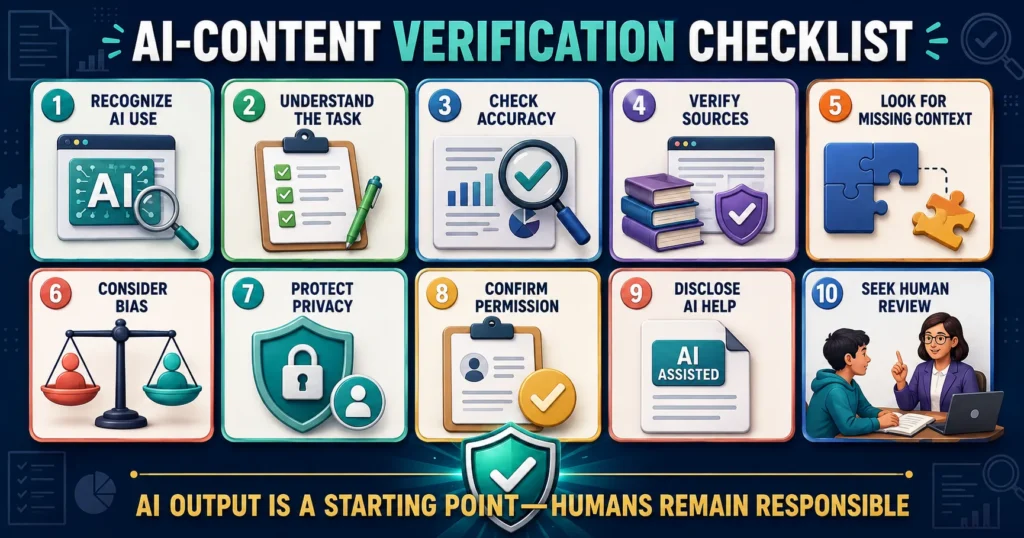
A Simple AI Literacy Checklist
Before accepting or sharing AI-generated content, ask:
- Do I know that AI was used?
- What task did I ask it to perform?
- Does the answer make sense?
- Which claims require verification?
- Are the sources real and reliable?
- Could important context be missing?
- Could the output contain bias?
- Did I share private information?
- Am I allowed to use AI for this purpose?
- Should I disclose that AI helped?
- Is a qualified human needed?
- Am I still responsible for the final result?
Common AI Literacy Myths
Myth: AI knows everything
AI systems have limitations and may lack current, local or specialized information.
Myth: A confident answer is probably correct
AI can state false information in polished and confident language.
Myth: AI thinks exactly like a human
AI systems process patterns and produce outputs differently from human understanding and experience.
Myth: AI is always objective
Data and design decisions can introduce bias.
Myth: Children already understand AI because they use technology
Using an application does not automatically teach privacy, ethics, fact-checking or how algorithms work.
Myth: AI literacy means learning to code
Coding can help, but AI literacy also includes critical, ethical and practical skills for non-programmers.
Myth: AI should either be completely accepted or completely banned
A balanced approach considers the purpose, age, risks, benefits and available safeguards.
The Future of AI Literacy
AI literacy will continue changing as artificial intelligence becomes more capable and widely used.
Future learners may need to understand:
- AI agents that perform multi-step tasks
- Synthetic audio and video
- Automated decision systems
- Personal AI assistants
- Robotics
- AI-generated virtual environments
- Data ownership
- Human-AI collaboration
- Laws and professional responsibilities
The exact tools will change. Skills such as curiosity, verification, privacy awareness and ethical judgment will remain valuable.
Frequently Asked Questions
What is AI literacy in simple words?
AI literacy is the ability to understand how artificial intelligence is used, evaluate its results and use it safely and responsibly.
Why is AI literacy important for students?
It helps students verify AI-generated information, protect privacy, recognize bias, follow academic rules and use AI to support rather than replace learning.
Is AI literacy the same as digital literacy?
No. Digital literacy covers the broader use of digital devices, information and online communication. AI literacy focuses specifically on AI systems, generated content, data, bias and automated decisions.
Does AI literacy require coding?
No. Coding can provide deeper technical knowledge, but every person can develop AI literacy through critical thinking, privacy awareness, fact-checking and responsible use.
What are the basic AI literacy skills?
Important skills include recognizing AI, understanding its basic operation, writing clear prompts, checking outputs, identifying bias, protecting privacy and using AI ethically.
At what age should children learn AI literacy?
Children can begin with simple ideas during the early school years, such as understanding that a chatbot is not a person and that AI can make mistakes. More complex topics can be introduced gradually.
Can children use generative AI?
Children should use age-appropriate tools in accordance with the service’s rules, school policies and parental guidance. Parents should review privacy practices and supervise younger users.
Is information generated by AI reliable?
It may be accurate, incomplete or incorrect. Important claims should be verified using trustworthy and independent sources.
What is an AI hallucination?
An AI hallucination is an output that presents invented, inaccurate or unsupported information as though it were true.
How can teachers teach AI literacy?
Teachers can ask students to examine AI responses, verify sources, identify bias, compare different outputs and discuss privacy and ethical use across different subjects.
What information should children never give an AI tool?
Children should not share passwords, addresses, school details, identification documents, private photographs, medical information or another person’s confidential data without appropriate adult guidance.
Can AI replace teachers?
AI can assist with explanation, practice and administration, but it cannot replace the full human role of teachers, including professional judgment, relationships, motivation, safeguarding and understanding individual circumstances.
Final Thoughts
So, what is AI literacy?
AI literacy is the ability to understand, evaluate and use artificial intelligence safely, critically, ethically and effectively.
It is not limited to coding or prompt writing. It includes recognizing AI, understanding its dependence on data, identifying mistakes, questioning bias, protecting privacy, verifying content and keeping people responsible for important decisions.
For children, AI literacy should develop gradually. Younger children can learn that AI is not a person and can make mistakes. Older students can examine evidence, bias, deepfakes, data and ethical use.
Parents and teachers do not need to have every answer before starting these conversations. Learning alongside children can itself model an important lesson: new technology should be approached with curiosity, evidence and thoughtful questions.
The goal is not to teach children to trust AI or fear it. The goal is to help them decide when it is useful, when it is unreliable and when human judgment must come first.
Editorial Note
AI tools, policies and capabilities continue to change rapidly. This article provides general educational guidance based on sources available in August 2026. Parents and schools should review the current terms, privacy policies and minimum-age requirements of any AI service before children use it.