
The internet gives children access to education, entertainment, games, creativity and communication. However, it can also expose them to harmful content, cyberbullying, scams, privacy violations, inappropriate contact and pressure from people who may not be who they claim to be.
Parents cannot monitor every click forever. The long-term goal is to help children develop the judgment and confidence needed to make safer decisions when an adult is not beside them.
So, how can parents keep children safe online?
Begin with age-appropriate access, private accounts, strong passwords, secure devices and clear family rules. Teach children not to share personal information, accept unknown contacts or move private conversations to another platform. Most importantly, create a relationship in which children feel safe reporting mistakes and uncomfortable experiences without expecting immediate blame.
Parental controls can reduce risk, but they cannot replace regular conversations, digital literacy and trust.
This guide explains the main online risks children face and provides practical steps parents can take to create a safer digital environment.
What Does Online Safety for Children Mean?
Online safety for children means protecting children’s privacy, identity, well-being and security while helping them use digital technology responsibly.
It covers:
- Social media
- Online games
- Messaging applications
- Video platforms
- Search engines
- AI chatbots
- Educational websites
- Smart toys and watches
- Phones, tablets and computers
- Online shopping and in-app purchases
Online safety is not simply about blocking inappropriate websites. It also involves teaching children how to recognize manipulation, protect personal information, respond to bullying, question online claims and ask for help.
An effective safety plan should change as the child grows. A young child may need carefully selected content and close supervision, while a teenager needs increasing independence alongside clear boundaries and continued adult support.
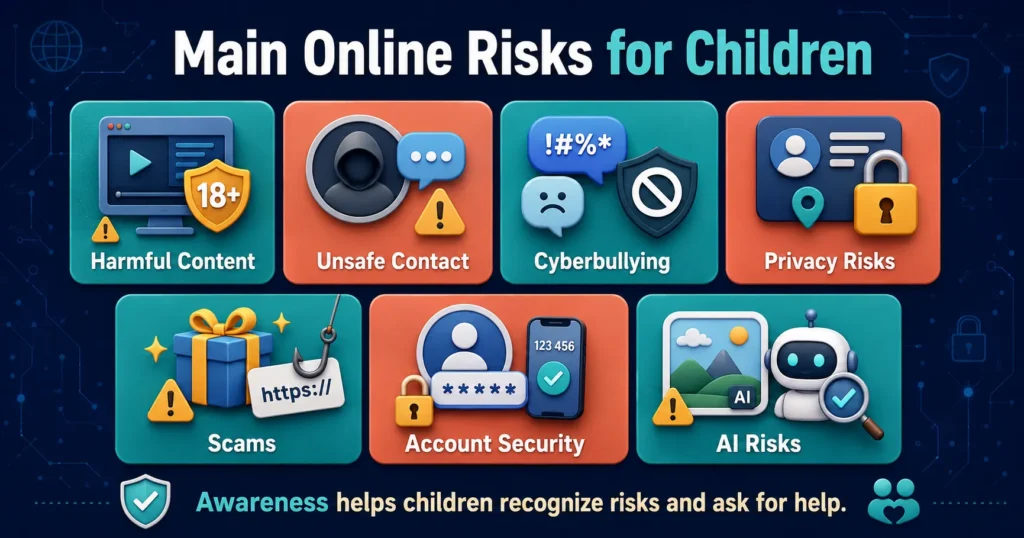
What Are the Main Online Risks for Children?
Children can encounter several types of risk online.
| Online risk | What it may involve |
|---|---|
| Harmful content | Violence, sexual material, hate speech, self-harm content or dangerous challenges |
| Contact risk | Inappropriate communication, grooming, requests for images or pressure to meet |
| Conduct risk | Cyberbullying, harassment, sharing harmful posts or excluding others |
| Privacy risk | Revealing names, locations, school information, photographs or passwords |
| Commercial risk | Scams, deceptive advertising, in-app purchases and gambling-like features |
| Security risk | Account theft, malware, phishing and suspicious downloads |
| AI risk | Deepfakes, false information, manipulated images and unsafe chatbot advice |
A child’s age, maturity, platform choices and family circumstances affect which risks are most relevant.
1. Start Online-Safety Conversations Early
Do not wait until a child receives a personal phone or social-media account.
Even young children can understand simple rules such as:
- Ask before downloading something
- Do not talk privately to unknown people
- Tell an adult if something feels scary
- Do not share the family’s address
- Not everything online is true
- Ask before buying anything
Keep conversations short and regular. A single serious lecture may be forgotten, while small discussions during everyday technology use are easier to remember.
UNICEF recommends setting clear rules, spending time with children online and modelling healthy digital behaviour. UNICEF: How to Keep Your Child Safe Online
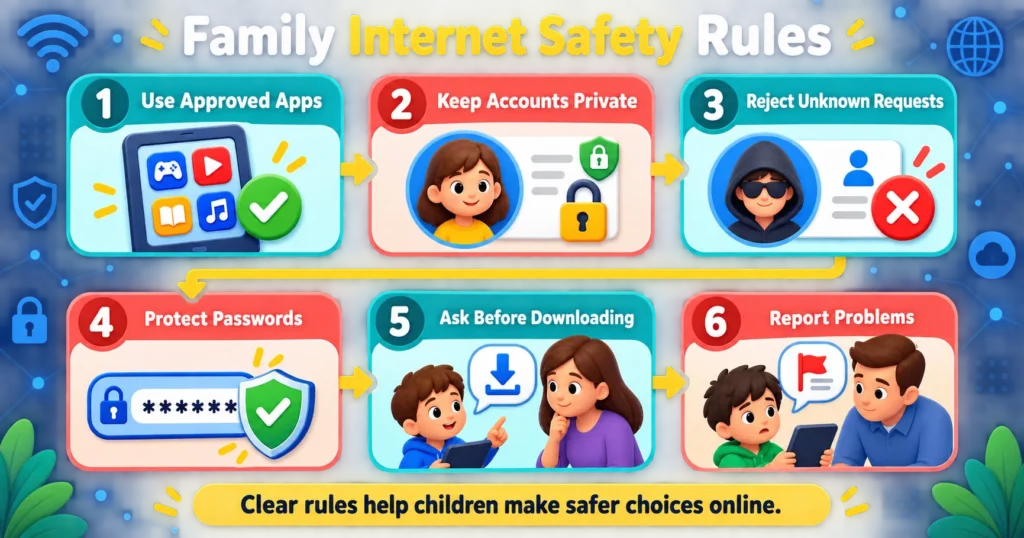
2. Create Clear Family Internet Rules
Children need to understand what is allowed before a problem occurs.
Family rules might include:
- Use only age-appropriate applications approved by a parent.
- Keep personal accounts private.
- Do not accept requests from unknown people.
- Never share passwords or verification codes.
- Ask before downloading an application or file.
- Ask before making a purchase.
- Keep devices outside bedrooms overnight.
- Do not send private or revealing photographs.
- Tell an adult about frightening, sexual, threatening or confusing content.
- Treat other people respectfully online.
Explain why each rule exists. Rules are more useful when children understand the risk they are intended to prevent.
Review the agreement whenever the child receives a new device, joins a platform or becomes old enough for additional independence.
3. Use the Correct Age on Every Account
Enter the child’s real date of birth when creating an account.
Many platforms use age information to determine:
- Which content is available
- Whether accounts are private by default
- Who can communicate with the child
- Whether parental consent is required
- Which advertising protections apply
- Which features can be accessed
Entering an older age may remove safeguards designed for children.
A service that requires users to be 13 or older should not be made available to a younger child by entering a false birthday. Instead, use a child-specific or parent-managed alternative.
Age requirements can differ by country, so parents should check the provider’s current official terms.
4. Set Up Accounts Together
Do not hand a child a new device or application before reviewing its settings.
During setup:
- Use the correct birth date
- Create a safe username
- Make the profile private
- Turn off unnecessary location sharing
- Restrict communication
- Disable public discoverability where possible
- Require approval for purchases
- Review camera and microphone permissions
- Activate parental controls
- Set a strong account password
- Enable multi-factor authentication
A username should not contain the child’s full name, school, location or birth year.
For example, AyeshaMemon2015Karachi could reveal several identifying details. A nickname unrelated to the child’s identity is safer.
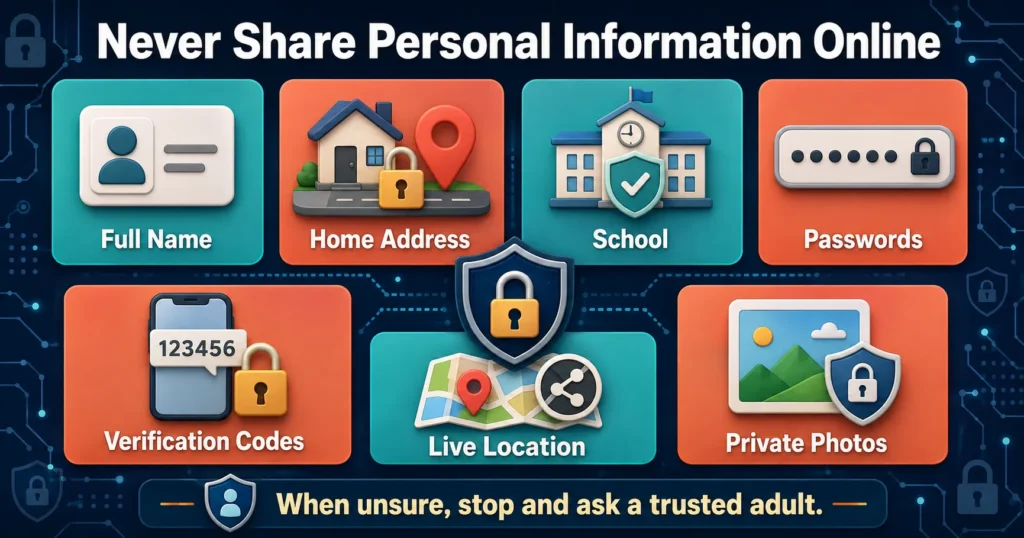
5. Keep Personal Information Private
Children may not recognize how small details can be combined to identify them.
Teach children not to share:
- Full name
- Home address
- Phone number
- School name or uniform
- Email address
- Passwords
- Verification codes
- Live location
- Daily schedule
- Travel plans
- Financial information
- Identification documents
- Private family information
- Personal or revealing photographs
Even an innocent photograph can reveal information through a school badge, street sign, house number or location tag.
UNICEF advises parents to review devices, permissions and privacy settings and to help children understand the permanent digital record created by posts and shares. UNICEF Online Privacy Checklist.
6. Make Social-Media Accounts Private
A private account reduces public access, although it does not guarantee privacy.
Review:
- Who can follow the child
- Who can send messages
- Who can comment
- Who can tag the child
- Who can see stories
- Who can view the child’s connections
- Whether the account appears in search
- Whether the child’s location is attached to posts
- Whether other people can download or reuse content
Check the follower list with younger children. Ask them to explain who each person is.
A username or profile photograph is not proof of identity. Someone can copy another child’s name and image.
Children should also know that followers can take screenshots. A private post can still be copied and shared elsewhere.
7. Teach Children About Online Strangers
The traditional message “never talk to strangers” is difficult to apply online because many games and communities involve people the child does not know personally.
A more practical rule is:
Be polite in public online spaces, but do not form private relationships, share personal details or move conversations elsewhere without adult approval.
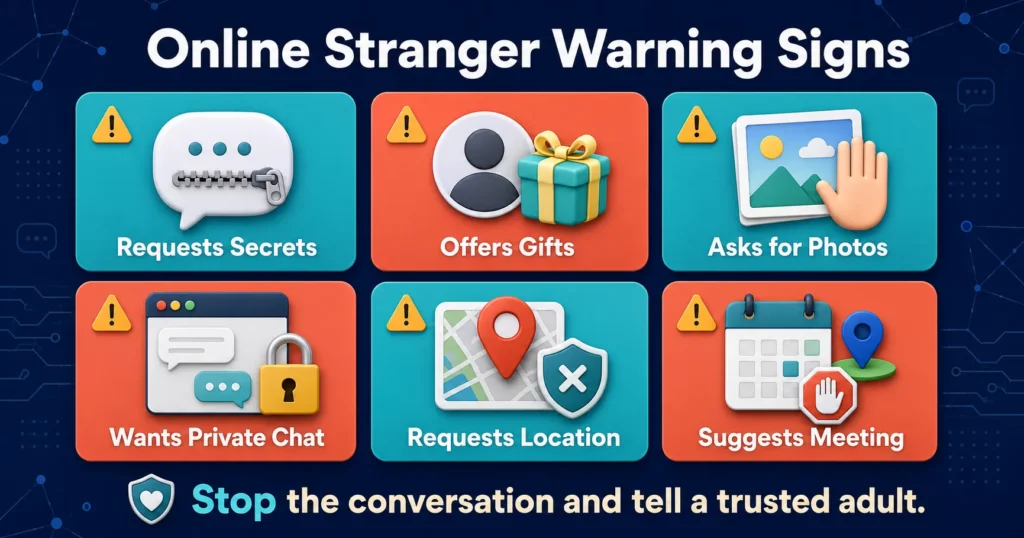
Warning signs include someone who:
- Asks the child to keep secrets
- Quickly gives excessive compliments
- Claims to understand the child better than family or friends
- Offers gifts, Robux, game currency or money
- Asks for photographs
- Requests the child’s age, school or location
- Wants to move to a private messaging application
- Becomes angry when the child refuses
- Threatens to share information or images
- Pretends that a dangerous request is a joke or challenge
- Asks the child to meet offline
Teach children that manipulation can come from someone who appears kind, patient and interested—not only from someone who behaves obviously badly.
8. Keep Conversations on Approved Platforms
A person with harmful intentions may try to move a child from a moderated game or platform to a more private service.
Children should be cautious when someone asks them to switch to:
- Snapchat
- Discord
- Telegram
- Private email
- Encrypted messaging
- A secret or disappearing chat
Changing platforms may remove safety filters and make the conversation harder to report.
A child should ask a parent before continuing a private online friendship or sharing another account name.
9. Explain Grooming in Age-Appropriate Language
Online grooming occurs when someone builds trust with a child for exploitation, abuse or another harmful purpose.
For a younger child, explain:
“Some people online pretend to be friendly so they can ask children to do something unsafe. You can always show me a message, even if you already replied.”
Older children can learn that grooming may involve:
- Friendship
- Romantic attention
- Sympathy
- Gifts
- Shared secrets
- Isolation from trusted adults
- Gradually sexual conversation
- Requests for images
- Threats or blackmail
Avoid suggesting that only adults groom children. A harmful account may claim to be another teenager, and exploitation can also involve peers.
10. Teach Children Never to Share Intimate Images
Children should never be pressured into creating or sharing intimate photographs or videos.
Make clear that:
- A romantic partner is not entitled to an image
- A person who cares about them will respect “no”
- Disappearing messages can still be captured
- An image can be copied without permission
- Threats to end a friendship are manipulation
- They should seek help immediately if someone pressures them
If a child has already shared an image, do not begin with blame.
Say:
“Thank you for telling me. We are going to handle this together.”
The child’s immediate safety is more important than punishment.
Do not ask the child to forward an explicit image to you. Preserve relevant account names, messages, links and non-explicit screenshots where safe, and seek guidance from the platform or appropriate authorities.
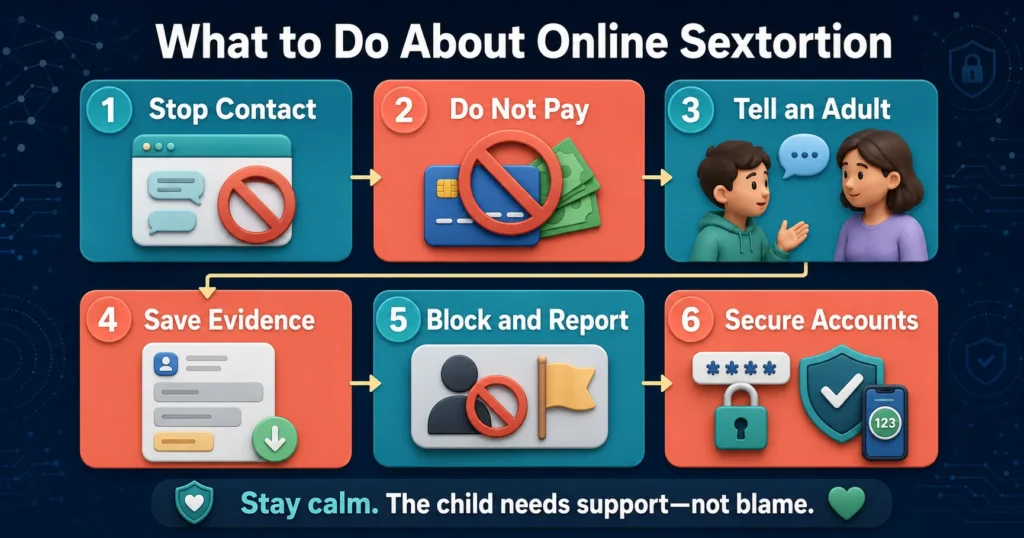
11. Protect Children From Sextortion
Sextortion is blackmail involving intimate or supposedly intimate images.
An offender may:
- Obtain a real image
- Trick the child into sending one
- Steal material from an account
- Create a fake image using AI
- Threaten to send it to family or classmates
- Demand money or additional content
Teach children not to pay, continue negotiating or send more material. Compliance rarely guarantees that the threats will end.
Instead:
- Stop communicating.
- Do not send additional images or money.
- Tell a trusted adult immediately.
- Preserve relevant evidence.
- Block and report the account.
- Secure the child’s accounts.
- Contact the appropriate child-protection or law-enforcement service.
If the child appears at risk of self-harm or immediate danger, remain with them and contact local emergency services.
12. Protect Children’s Photographs From AI Misuse
Artificial intelligence can alter ordinary photographs to create realistic fake images, including sexualized deepfakes.
UNICEF reported in 2026 that at least 1.2 million children across an 11-country study said their images had been manipulated into explicit deepfakes during the previous year. UNICEF emphasizes that deepfake abuse is real abuse even when the image is fabricated. UNICEF: Deepfake Abuse Is Abuse
Parents can reduce exposure by:
- Limiting public photographs
- Keeping children’s accounts private
- Asking schools how photographs are used
- Avoiding identifiable uniforms and locations
- Removing location metadata where possible
- Asking a child’s permission before posting
- Requesting relatives not to publish images publicly
- Reporting manipulated images immediately
These steps cannot guarantee that misuse will never occur. Responsibility always belongs to the person creating or sharing abusive content—not to the child whose photograph was used.
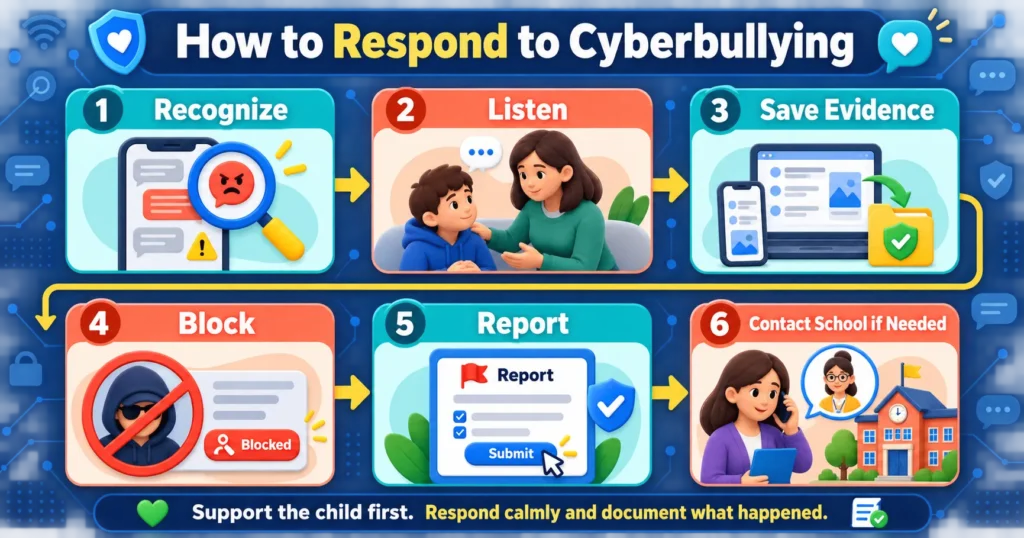
13. Teach Children to Recognize Cyberbullying
Cyberbullying can include:
- Repeated insults
- Threatening messages
- Spreading rumours
- Sharing embarrassing images
- Creating fake profiles
- Deliberately excluding someone
- Posting private conversations
- Harassing someone in a game
- Encouraging others to attack an account
A child experiencing cyberbullying may:
- Avoid a device they previously enjoyed
- Become upset after receiving notifications
- Hide online activity
- Lose sleep
- Avoid school
- Withdraw from friends
- Become anxious about photographs or posts
Do not simply tell the child to ignore everything. Listen, document the behaviour and help them use blocking and reporting features.
Where appropriate, involve the school if classmates are responsible or if online conduct is affecting the child’s education.
14. Teach Children to Be Kind Online
Online safety includes the child’s own conduct.
Teach children not to:
- Forward humiliating content
- Join a group attacking someone
- Share screenshots of private conversations
- Create fake accounts
- Post another person’s photograph without permission
- Exclude someone deliberately for entertainment
- Use AI to create harmful images
- Send messages they would not say face to face
A child can be both a victim and a participant in harmful behaviour. Respond to misconduct with appropriate consequences while helping the child understand the effect on others.
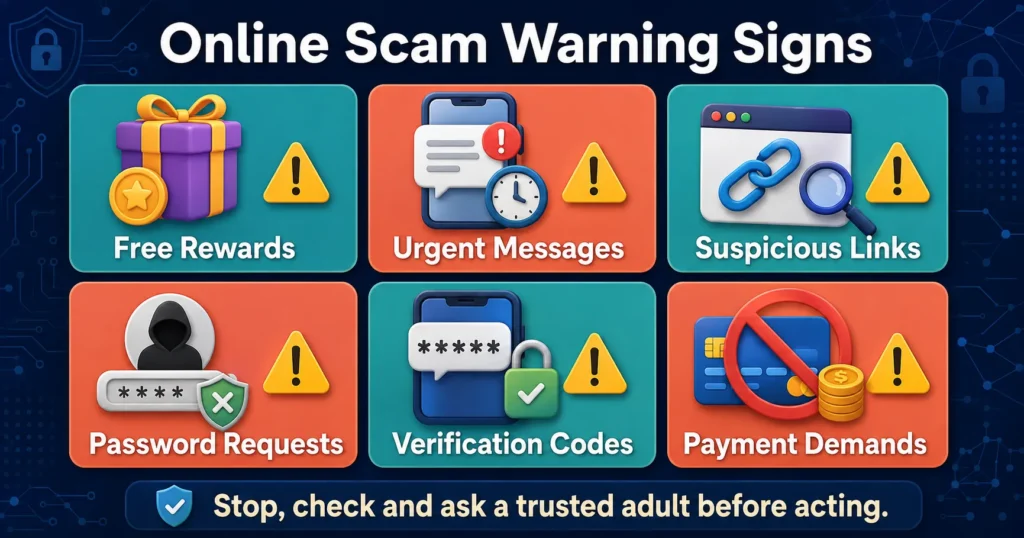
15. Help Children Recognize Online Scams
Scams targeting children may promise:
- Free game currency
- Rare items
- Giveaways
- Contest prizes
- Account upgrades
- Free devices
- Influencer opportunities
- Scholarships
- Urgent help for a friend
A scam may ask the child to:
- Click a link
- Download a file
- Enter a password
- Share a verification code
- Pay a small fee
- Complete a survey
- Provide a parent’s bank-card information
- Move to another application
Teach the child to stop and ask an adult whenever a message creates urgency, fear or excitement.
The US Federal Trade Commission advises children not to open unexpected links or attachments and not to reply to messages requesting personal information, even if the message appears to come from someone familiar. FTC: Heads Up—Stop, Think, Connect.
16. Use Strong, Unique Passwords
Every important account should have a different password.
A strong password should:
- Be long
- Be difficult to guess
- Avoid names and birthdays
- Not be reused
- Remain private
- Be stored safely
A password manager can help parents and older teenagers create and save unique passwords.
Enable multi-factor authentication where available. This adds another check when someone tries to access the account.
Children should never share a password or one-time verification code with:
- Friends
- Gaming partners
- Online sellers
- Someone claiming to be platform support
- A person offering free rewards
Parents may need access to younger children’s accounts, but the arrangement should be explained clearly rather than encouraging general password sharing.
17. Keep Devices and Applications Updated
Updates often fix security weaknesses.
Enable automatic updates for:
- Phones
- Tablets
- Computers
- Web browsers
- Games
- Messaging applications
- Antivirus or security software
- Internet-connected toys and watches
The FTC recommends automatic updates, strong passwords, secure home Wi-Fi and purchase controls as basic protections for children’s devices. FTC: Help Kids Protect Their Devices
Delete applications the child no longer uses because forgotten accounts can continue holding personal information.
18. Review Application Permissions
Before approving an application, check what it wants to access.
Ask whether the app genuinely needs:
- Location
- Camera
- Microphone
- Contacts
- Photographs
- Files
- Bluetooth
- Calendar
- Health data
A drawing game probably does not need continuous location access. A flashlight application should not require the child’s contacts.
Choose “only while using the app” instead of permanent permission where appropriate.
Review permissions every few months because updates may introduce new features.
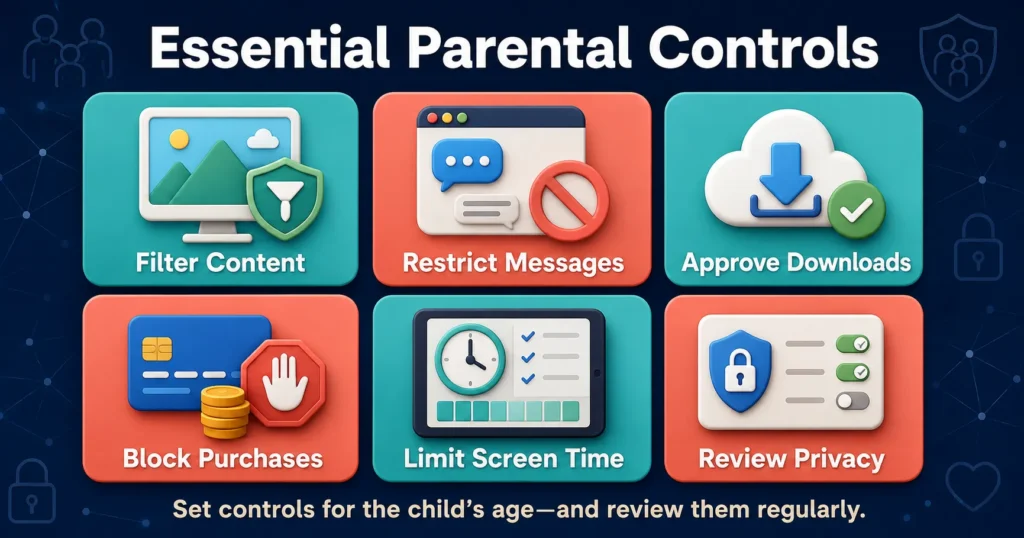
19. Use Parental Controls
Parental controls can help families:
- Filter content
- Limit communication
- Block downloads
- Approve purchases
- Set screen-time schedules
- Restrict applications
- Review activity
- Disable location sharing
- Manage browsers
- Protect settings with a passcode
Possible controls include:
- Apple Screen Time
- Google Family Link
- Microsoft Family Safety
- Gaming-console family settings
- Platform-specific parent accounts
- Home-router controls
Set controls according to age. Younger children need stronger restrictions, while older children should gradually learn to manage risk independently.
Tell children what is being monitored and why. Secret surveillance can damage trust unless there is a serious, specific safety concern.
20. Control In-App Purchases
Games and applications may encourage children to buy virtual currency, cosmetic items, subscriptions or randomized rewards.
Parents can:
- Remove saved payment cards
- Require a password for purchases
- Disable in-app transactions
- Set monthly limits
- Turn on spending notifications
- Explain the real-money value
- Review subscriptions regularly
Children should understand that virtual currency still represents real money.
Advertising and purchasing systems can be difficult for children to evaluate, particularly when games use countdowns, limited offers or social pressure.
21. Make Online Gaming Safer
Online games may allow voice chat, text messages, purchases and contact with strangers.
Before approving a game, check:
- Its age rating
- Content descriptors
- Communication features
- In-game purchases
- Private-server options
- Reporting tools
- Whether strangers can join
- Whether the child’s status is visible
- Whether location or real names appear
For younger children:
- Disable voice and direct chat
- Limit play to known friends
- Use private servers where possible
- Review connections
- Require purchase approval
- Play together occasionally
Remind children not to move a gaming friendship to private messaging without permission.
22. Make Social Media Safer
Before a child joins social media, consider whether they can:
- Follow privacy rules
- Handle unkind comments
- Recognize advertising
- Avoid oversharing
- Block and report users
- Stop scrolling at an agreed time
- Ask for help
- Understand that posts may be permanent
Use private accounts and restrict direct messages. Turn off precise location sharing and review who can tag or mention the child.
Children should not post while still at a location. Sharing a photograph after leaving is safer than revealing a live location.
23. Guide Children’s Use of AI Chatbots
AI chatbots can explain lessons and support creativity, but they can also:
- Give incorrect information
- Produce inappropriate responses
- Collect personal data
- Encourage overdependence
- Appear more human than they are
- Offer unsuitable advice
- Generate or manipulate images
- Be used for scams and impersonation
Children should use only age-appropriate AI tools approved by a parent or school.
Teach them:
- A chatbot is not a person
- AI can make mistakes
- Private information should not be entered
- Important answers require verification
- AI should not replace a trusted adult
- AI-generated images may be fake
- Disturbing responses should be shown to an adult
Children should not rely on AI for emergencies, abuse disclosures or serious medical and mental-health decisions.
24. Check What Parents Share About Their Children
Parents contribute to a child’s digital footprint through sharenting, or posting information about children online.
Before sharing, ask:
- Does this reveal the child’s school?
- Is the location visible?
- Could the photograph embarrass the child later?
- Is the child partially dressed?
- Does the post contain medical or behavioural information?
- Would the child want this made public?
- Can I share it privately instead?
- Did I ask the child’s permission where appropriate?
Avoid publishing bath photographs, private medical information, school documents, daily routines or images that may be misused.
Respecting a child’s privacy teaches them that consent applies online.
25. Explore the Internet Together
Parents do not need to understand every trend before talking about it.
Ask children to show you:
- Their favourite game
- A creator they watch
- How a platform’s chat works
- Which applications their friends use
- How to report an account
- Why a particular trend is popular
- What makes them uncomfortable online
Approach these conversations with curiosity.
If children believe parents consider every online activity foolish or dangerous, they may stop sharing important information.
26. Model Safe Online Behaviour
Children observe adults.
Parents can model online safety by:
- Using strong passwords
- Asking before sharing photographs
- Checking sources
- Avoiding phones while driving
- Keeping private matters off public platforms
- Ignoring suspicious links
- Reporting scams
- Not insulting others online
- Putting devices away during conversations
- Admitting mistakes
Family rules are easier to respect when adults follow them too.
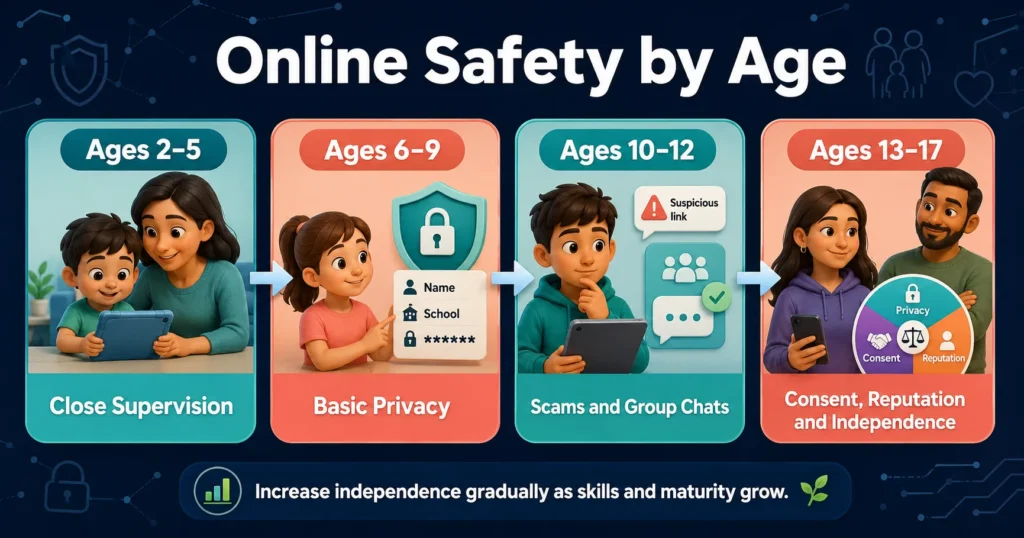
Online Safety by Age
Ages 2–5
Young children need close supervision and carefully selected content.
Parents should:
- Use child-specific applications
- Choose content themselves
- Keep search restricted
- Disable communication
- Avoid unsupervised browsing
- Use short planned sessions
- Keep devices in shared spaces
- Teach “stop and tell an adult”
Ages 6–9
Children can begin learning basic privacy and security.
Teach them:
- Never share their full name or school
- Ask before downloading
- Use only approved games
- Do not accept unknown connections
- Tell an adult about frightening content
- Advertisements may try to influence them
- Online people may not be who they claim
Ages 10–12
Children may seek more independence and social interaction.
Discuss:
- Cyberbullying
- Group chats
- Gaming strangers
- In-app purchases
- Password security
- Edited photographs
- Social pressure
- Scams
- Location sharing
- Moving conversations between platforms
Review connections and settings regularly.
Ages 13–17
Teenagers need privacy as well as continued protection.
Discuss:
- Digital reputation
- Romantic relationships
- Consent
- Intimate images
- Sextortion
- Deepfakes
- Social-media pressure
- Misinformation
- AI chatbots
- Financial scams
- Meeting online contacts
- Reporting and support
Create collaborative rules and explain any monitoring. Teenagers are more likely to seek help when parents respect age-appropriate independence.
What Should Children Do When Something Feels Wrong?
Teach a simple response:
Stop
Do not reply, pay, click or send additional information.
Leave
Close the conversation, game, website or application.
Save
Preserve usernames, messages, links and relevant evidence when safe. Do not redistribute explicit material.
Block
Prevent the person from contacting the child again.
Report
Use the platform’s reporting system.
Tell
Inform a trusted adult immediately.
Children should know that they can ask for help even if:
- They broke a family rule
- They clicked something
- They replied
- They shared information
- They feel embarrassed
- The other person threatened them
What Should Parents Do After an Online-Safety Incident?
When a child reports a problem:
- Stay calm.
- Thank the child for telling you.
- Check whether the child is in immediate danger.
- Stop further communication.
- Preserve relevant evidence safely.
- Block and report the account.
- Change passwords where needed.
- Review linked accounts and device security.
- Contact the school if classmates are involved.
- Seek professional or official help when necessary.
Do not publicly confront the suspected offender or circulate the evidence. This may increase risk or interfere with an investigation.
Do not forward sexual images of a minor, even for evidence. Ask the relevant authority how to preserve information safely.
When Should Parents Contact Authorities?
Seek immediate official assistance when an incident involves:
- Sexual communication with a child
- Requests for intimate images
- Sextortion
- Threats of violence
- Stalking
- Planned in-person meetings
- Child sexual-abuse material
- Persistent harassment
- Financial blackmail
- Account compromise linked to danger
- A credible threat of self-harm
Contact the appropriate local police, cybercrime authority, child-protection service or emergency service in your country.
Platform reporting alone may not be sufficient for serious exploitation or immediate danger.
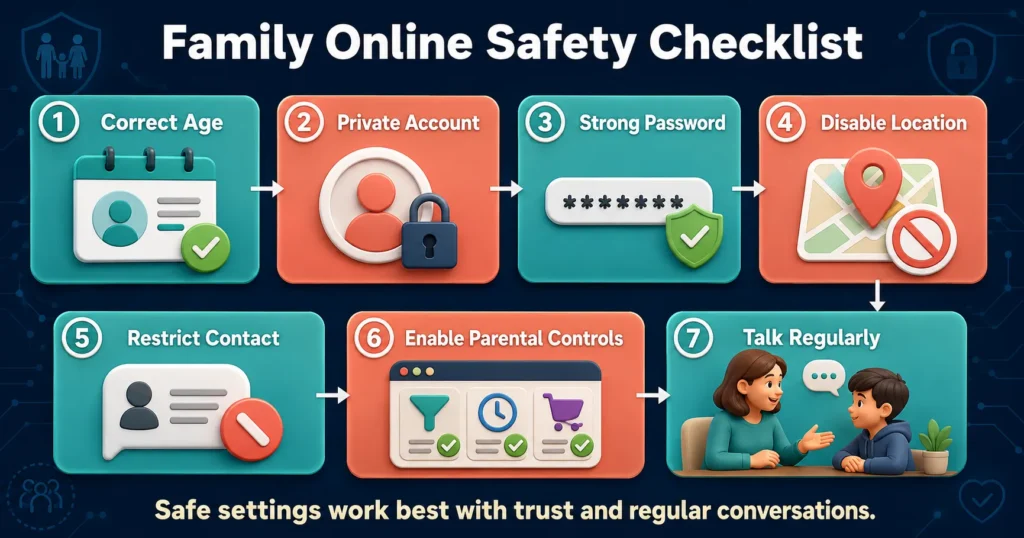
A Family Online-Safety Checklist
Use this checklist when introducing a new device or platform:
- Is the child old enough under the service’s rules?
- Is the birth date correct?
- Is the account private?
- Can strangers contact the child?
- Is location sharing disabled?
- Are camera and microphone permissions necessary?
- Is the password unique?
- Is multi-factor authentication enabled?
- Are purchases restricted?
- Are parental controls active?
- Does the child know how to block and report?
- Does the child know which information is private?
- Have we discussed scams and unknown links?
- Does the child know they can ask for help without immediate blame?
- Will we review the settings regularly?
Common Online-Safety Mistakes Parents Should Avoid
Relying completely on parental controls
Filters and limits can fail. Children still need knowledge, communication and practice making safe decisions.
Using fear as the only teaching method
Extreme warnings may cause anxiety or make children hide normal online activity.
Threatening to remove every device
If disclosure always leads to total loss of access, children may conceal serious incidents.
Secretly monitoring everything
Younger children require close oversight, but older children need increasing privacy. Explain monitoring unless immediate safety would be compromised.
Ignoring platform age requirements
Entering a false age can remove protections and place children in an unsuitable digital environment.
Posting too much about children
Parents should protect the same privacy they ask children to maintain.
Blaming the child after manipulation
The person who groomed, threatened or exploited the child is responsible for that abuse.
Frequently Asked Questions
What is the best way to keep children safe online?
Combine private accounts, secure devices, parental controls, clear rules and regular conversations. No single tool can provide complete protection.
What personal information should children keep private?
Children should protect their full name, address, school, phone number, passwords, verification codes, live location, private photographs and financial information.
Should parents monitor everything children do online?
Younger children need close supervision. Older children generally need increasing privacy alongside clear safety expectations. Parents should explain what they monitor and why.
Can parental controls block all harmful content?
No. Parental controls reduce risk but cannot identify every harmful video, message or interaction. Children still need blocking, reporting and help-seeking skills.
How can parents protect children from online strangers?
Restrict communication, use private accounts, review connections and teach children not to share personal details, keep secrets or move conversations to another platform.
What should a child do after receiving an inappropriate message?
The child should stop responding, preserve relevant evidence, block and report the account and tell a trusted adult immediately.
What is online grooming?
Online grooming is a process in which someone builds trust with a child to manipulate, exploit or abuse them. It can involve friendship, gifts, secrecy, romantic attention or threats.
How can parents stop cyberbullying?
Listen to the child, save evidence, block and report the offender and involve the school or relevant authority where appropriate. Focus first on the child’s safety and well-being.
Are online games safe for children?
Some games may be appropriate when parents review age ratings, communication, purchases and privacy settings. Multiplayer games with open chat require additional caution.
How can children avoid online scams?
Teach them not to click unexpected links, share passwords, pay urgent requests or trust offers of free currency and prizes. They should ask an adult before acting.
Is social media safe for children?
It depends on age, maturity, platform settings and supervision. Children should meet the platform’s age requirement and understand privacy, reporting and respectful behaviour.
Are AI chatbots safe for children?
AI tools can provide useful information but may make mistakes, collect data or give inappropriate advice. Children should use age-appropriate tools with adult or school approval.
What should parents do if an intimate image has been shared?
Remain calm, stop communication, preserve relevant non-explicit evidence, report the account and contact an appropriate child-protection or law-enforcement authority. Do not forward the image.
When should parents contact the police or cybercrime authorities?
Seek official help for sexual exploitation, sextortion, threats, stalking, planned meetings, serious harassment or any immediate risk to the child.
What Is Generation Alpha? Years, Traits and Future
Final Thoughts
Learning how to keep children safe online is not about removing the internet from childhood. It is about helping children enjoy its benefits while reducing preventable risks.
Begin with secure devices, correct account ages, private profiles, parental controls and clear family rules. Teach children to protect personal information, reject secret communication and recognize suspicious links, requests and offers.
The strongest protection is not a single application or filter. It is a combination of:
- Safe account settings
- Age-appropriate supervision
- Digital literacy
- Regular conversations
- Respect for privacy
- A trusted adult who responds calmly
Children will sometimes make mistakes. What matters is whether they know how to stop, report the problem and seek help.
A child who believes, “I can tell my parent anything, and we will solve it together,” is better protected than a child who believes safety depends on never making a mistake.
Editorial Note
Online platforms, laws and safety tools change frequently. This article provides general educational guidance based on information available in August 2026. Parents should confirm current platform settings and contact the appropriate services in their country for serious incidents.
This article does not replace individualized legal, mental-health, safeguarding or law-enforcement advice.
2 Comments