
How to sell digital products on Etsy as a teen starts with three things: an original product, a useful downloadable file, and a parent or guardian who can supervise your shop.
You do not need a warehouse or boxes of inventory. You could create a printable study planner, original digital stickers, or a simple budget worksheet. Customers purchase the product and download the files.
However, selling downloads takes more than uploading a pretty design. You need to follow Etsy’s age rules, explain what buyers receive, and price your work after fees.
This guide walks you through the process, using a printable study planner as an example.
Table of Contents
Can Teens Sell Digital Products on Etsy?
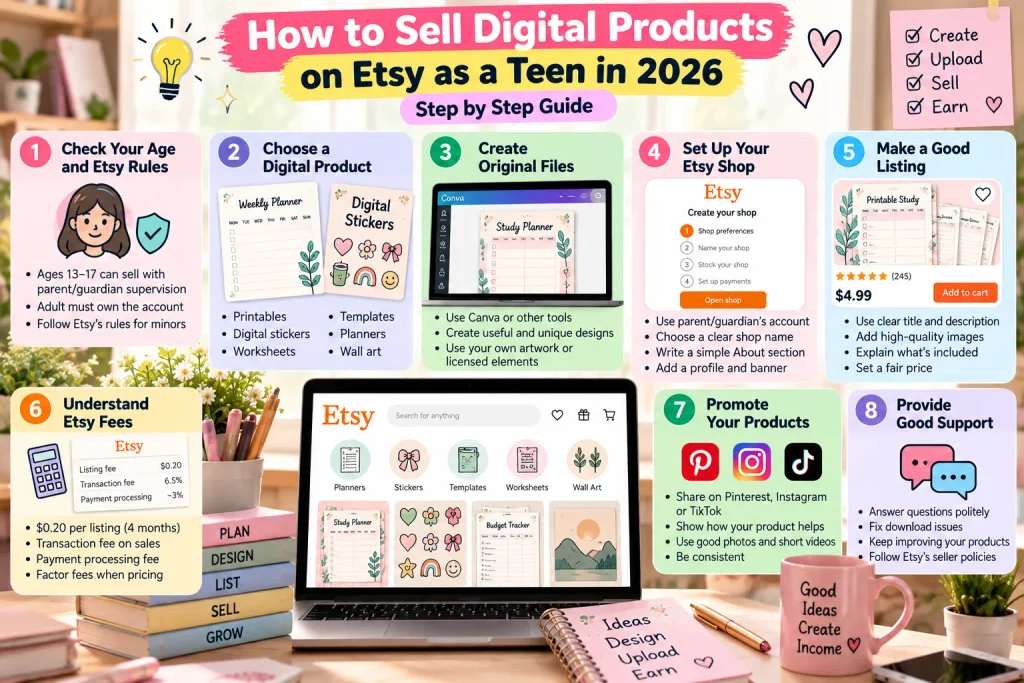
Yes. Etsy allows teenagers aged 13–17 to buy and sell with permission and direct supervision from a parent or legal guardian. The adult must register and own the account.
According to Etsy’s rules for minors, the adult’s name must be used for the account’s financial information and preferred name. The email must belong to the adult, and all shop members must be listed in the About section, with the adult identified as the owner.
A teen can contribute designs and help run the shop within those rules. Using a false age or opening an independent account before 18 can lead to account closure. Etsy Help
If you are under 13, work on your creative skills offline rather than using an Etsy account.
What Are Digital Products?
Digital products are files customers download instead of receiving a physical package.
For example, a buyer might purchase a PDF planner and print it at home. Another buyer might download original artwork to use as a phone wallpaper.
There are two main approaches:
- Instant downloads: You prepare the files before publishing the listing.
- Made-to-order downloads: You create a custom file after someone orders. Etsy
For a first shop, an instant download can be easier to manage around school because you do not need to customize every order.
You will still need to answer questions, fix problems, and update your products.
1. Choose One Useful Product
Start with something you understand and can make well.
| Product idea | Possible customer | What you could include |
|---|---|---|
| Printable study planner | Students organizing schoolwork | Weekly schedule, assignment tracker, revision checklist |
| Reading journal | Readers tracking books | Reading log, review pages, reading goals |
| Simple savings tracker | People working toward a savings goal | Goal sheet and progress tracker |
| Original digital stickers | People using digital notebooks | Your own illustrated PNG stickers |
| Printable party game | Families hosting celebrations | Original game sheets and instructions |
These are starting ideas, not guaranteed bestsellers.
A specific product is usually easier to explain than a general one. “Printable exam revision planner for high school students” gives buyers a clearer purpose than “cute planner.”
For your first attempt, choose one customer and one problem.
Example: A student needs to organize assignments and revision without printing a complicated 50-page workbook.
Your product could be a small, easy-to-use planner with five useful pages.
2. Research Similar Listings Without Copying
Search Etsy for phrases a customer might use, such as “printable student planner” or “exam revision tracker.”
Look at how existing listings explain:
- What files are included.
- Page sizes and formats.
- Whether the product is editable.
- How customers use it.
- Common questions or complaints in reviews.
Use this research to identify a practical improvement. Perhaps your planner could use less printer ink or include clearer instructions.
Do not copy another seller’s pages, wording, illustrations, or listing images. A small color change does not make someone else’s work your original product.
Set a time limit for research so you can move on to creating.
3. Create Original Files and Check Usage Rights
You can create a basic printable with design software, a word processor, or a drawing tool you already know.
For the study planner, make:
- A weekly planning page.
- An assignment tracker.
- An exam timetable.
- A revision checklist.
- A short instruction page.
Use readable fonts, clear labels, and enough writing space. A useful layout matters more than extra decoration.
Check the licenses for fonts, photographs, icons, and other assets. Permission to use an asset in a finished design does not automatically allow you to resell the asset itself or include it in an editable template.
Avoid unlicensed characters, celebrity images, sports logos, song lyrics, and other protected material.
Etsy’s Creativity Standards require seller-designed digital downloads to contain original content. They also require disclosure when an item is created using AI and do not allow AI prompt bundles. Etsy
AI can help you brainstorm a product name or review your instructions. Our ChatGPT for teens guide explains responsible ways to use AI while keeping your own judgment involved.
4. Export and Test Your Download
For a printable planner, PDF is a straightforward starting format.
If you want to serve buyers in different countries, consider providing both US Letter and A4 versions. Label them clearly.
Before uploading:
- Open every file.
- Check spelling, margins, and page order.
- Print a sample if possible.
- Confirm that text is readable.
- Remove personal information from pages and file properties.
- Ask someone else to follow the instructions.
If you sell an editable template, test the customer’s access process and explain whether they need an account, paid software, or a subscription.
Etsy’s digital listing instructions allow up to five files per listing, with a maximum of 20 MB each. Supported formats include PDF, PNG, and ZIP. Etsy
Give files descriptive names, such as Study-Planner-A4.pdf, rather than final-final-new.pdf.
5. Set Up a Supervised Etsy Shop
Before opening the shop, sit down with your parent or guardian and agree on responsibilities.
You might handle design and draft listing descriptions. Your parent might review messages, manage payments, and oversee account security.
The adult should complete registration using their own accurate information and follow Etsy’s verification requirements. Check whether Etsy supports new shops and payments in your country before spending money on setup.
Together, prepare:
- A shop name and simple branding.
- A clear About section explaining each person’s role.
- Payment and billing information.
- A small spending limit.
- A plan for customer support.
- A record of income and expenses.
Discuss local tax or business obligations with the adult responsible for the shop.
Do not assume that the adult-owned account can simply be transferred to you when you turn 18. Review Etsy’s account rules before making future ownership plans.
6. Write a Listing Buyers Can Understand
Your listing should answer: “What am I buying, and how will I use it?”
For the planner, a clear title could be:
Printable Student Study Planner PDF: Weekly Schedule and Exam Revision Tracker
Use previews that show the real pages. If you display the planner on a tablet or desk, make it clear that the device and other props are not included.
Include an image stating Digital Download — No Physical Item.
Your description should explain:
- The number of pages.
- File formats and sizes.
- Available paper sizes.
- Whether the files are editable.
- Printing or software requirements.
- What customers may do with the files.
- How to get help.
A simple opening might be:
This printable study planner includes five PDF pages for organizing assignments and exam revision. US Letter and A4 files are included. This is a digital download; no physical product will be shipped. The PDFs are not editable.
Choose relevant categories, attributes, and search terms. Describe the actual product instead of filling the title with unrelated popular keywords.
Explain your refund approach accurately and follow Etsy’s rules and applicable consumer law. Do not promise that digital products can never qualify for a refund.
7. Understand Etsy Fees Before Setting a Price
A digital product has no shipping cost, but selling it on Etsy is not free.
| Fee | What beginners should know |
|---|---|
| Shop setup | A one-time setup fee may apply; Etsy displays it during onboarding |
| Listing | $0.20 USD to publish or renew a listing |
| Transaction | 6.5% of the sale amount |
| Payment processing | Depends on the seller’s country |
| Advertising | Optional Etsy Ads cost money; qualifying Offsite Ads orders can carry an extra fee |
| Other charges | Taxes on fees, currency conversion, or regulatory fees may apply |
Listings normally expire after four months, and renewal can create another listing charge. Check Etsy’s Fees & Payments Policy before launching. Etsy
A Simple $5 Sale Example
For a US seller, Etsy’s payment processing fee is currently 3% plus $0.25. Etsy
For an illustrative $5 order without buyer tax or extra charges:
- Transaction fee: $5 × 6.5% = $0.325.
- Processing fee: $5 × 3% + $0.25 = $0.40.
- One listing or renewal fee: $0.20.
That leaves approximately $4.08, before other expenses or applicable taxes. Actual rounding and charges can vary.
This is a fee example, not a recommended price. Consider your design time, customer support, and product quality when choosing your price.
8. Launch Small and Learn From Real Buyers
You do not need dozens of products to begin.
Publish one polished product, then consider a few related items if you can maintain their quality.
Share a useful preview through an age-appropriate account, with your parent’s approval. For example, show how the planner organizes a busy exam week.
Keep payments and buyer communication on Etsy. Never share passwords or verification codes with someone claiming they can help you receive a sale.
For more family guidance, see our guide to keeping children safe online.
Check your results regularly:
- If people are not finding the listing, review its relevance and search terms.
- If people visit without buying, inspect the previews, description, and price.
- If buyers ask the same question, make the answer more visible.
These patterns suggest things to investigate; they do not prove why a listing is underperforming.
Avoid fake reviews, copied products, and promises of effortless income. Your first sale might take time, and some products may never sell.
A Beginner’s First-Week Plan
| Day | Task |
|---|---|
| 1 | Review Etsy’s age rules with your parent and choose one product |
| 2 | Research similar listings and define your product’s purpose |
| 3 | Create the original pages |
| 4 | Export, test, and improve the files |
| 5 | Prepare previews and write the description |
| 6 | Have the adult complete setup, review fees, and publish |
| 7 | Share a preview and record initial feedback |
Take longer if necessary. A tested product is worth more than a rushed launch.
Frequently Asked Questions
Can a 15-year-old sell digital products on Etsy?
Yes, with a parent or legal guardian’s permission and direct supervision. The adult must own and register the account, and the shop must meet Etsy’s requirements for minors.
What is a good first digital product for a teen?
A simple product you can create and test yourself, such as an original printable study planner or reading journal. Choose based on your skills and a clear customer need.
Can I start an Etsy shop for free?
Do not assume so. Listing fees apply, and Etsy may require a setup fee. Review the onboarding charges with your parent before opening the shop.
Can I use AI to help make products?
You can use AI within Etsy’s policies and the tool’s terms. Etsy requires disclosure for AI-created items. Check originality, accuracy, and usage rights before selling.
Do I need to ship digital products?
No physical shipping is needed for a digital download. You must still provide the correct files, clear instructions, and customer support.
How much can a teen earn from Etsy?
There is no guaranteed amount. Sales depend on demand, quality, pricing, visibility, and other factors. Track profit after fees and expenses rather than treating sales revenue as earnings.
How to Sell Digital Products on Etsy as a Teen – Start With One Product You Can Stand Behind
Selling digital products on Etsy as a teen can teach you design, pricing, customer service, and money management.
Begin with one useful original product. Test the files, open the shop with proper adult supervision, and give buyers an accurate description.
At Gen Alpha Magazine, we encourage young people to build practical digital skills. Your first goal can be a product that works well and a shop you know how to manage.