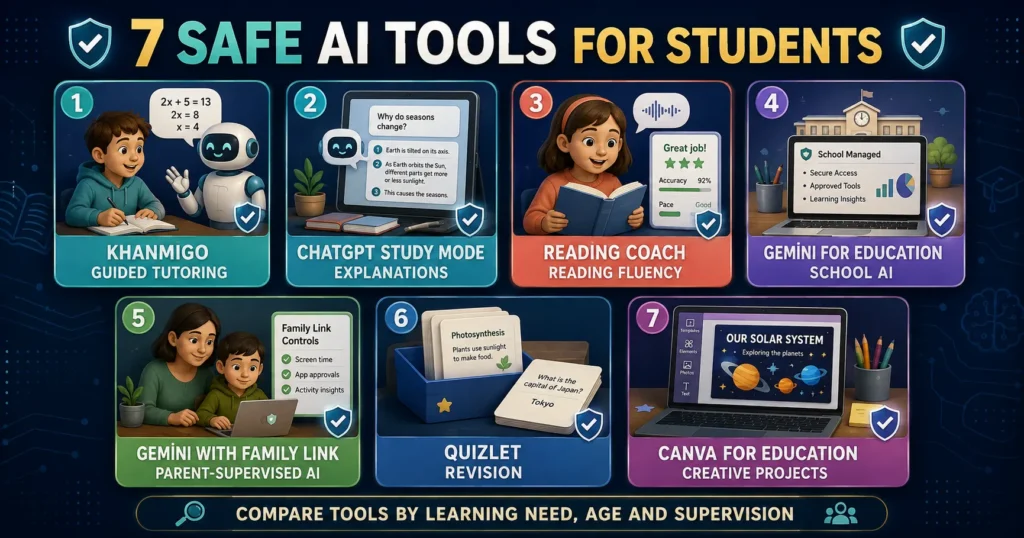
Artificial intelligence can help students understand difficult lessons, practise reading, create revision questions and organize their studies. However, not every popular AI tool was designed with children, education or student privacy in mind.
So, which are the best safe AI tools for students?
The most suitable tools provide age-appropriate access, clear privacy information, educational guidance and controls for parents, teachers or school administrators. They should encourage learning instead of completing every task for the student.
No AI tool is completely safe, accurate or appropriate for every child. Even education-focused platforms can make mistakes, produce unsuitable content or collect information parents did not intend to share.
Students should use AI only when they meet the service’s age requirements, have necessary adult permission and follow their school’s rules.
This guide compares seven useful AI study tools and explains how families and teachers can choose them responsibly.
Quick Comparison of the Best AI Tools for Students
| AI tool | Best for | Recommended user | Important safety consideration |
|---|---|---|---|
| Khanmigo | Guided tutoring | School-age learners with parent or school access | Parent or school supervision is built into student access |
| ChatGPT Study Mode | Step-by-step explanations | Teenagers who meet the minimum age | Can make mistakes; school permission and verification required |
| Microsoft Reading Coach | Reading fluency | Developing and multilingual readers | Uses microphone-based reading practice; review data settings |
| Gemini for Education | School-managed AI assistance | Students using approved school accounts | Access and features depend on school administration |
| Gemini with Family Link | Parent-supervised general AI | Eligible children using supervised Google accounts | Parent must enable access for younger children |
| Quizlet AI Study Tools | Flashcards, tests and revision | Students revising existing material | User-created and AI-generated content may contain errors |
| Canva for Education AI Tools | Visual projects and presentations | Students in teacher-managed classrooms | Students must follow school rules for AI-generated media |
Availability, prices, age requirements and features vary by country and can change. Parents and schools should confirm the current terms before creating an account.
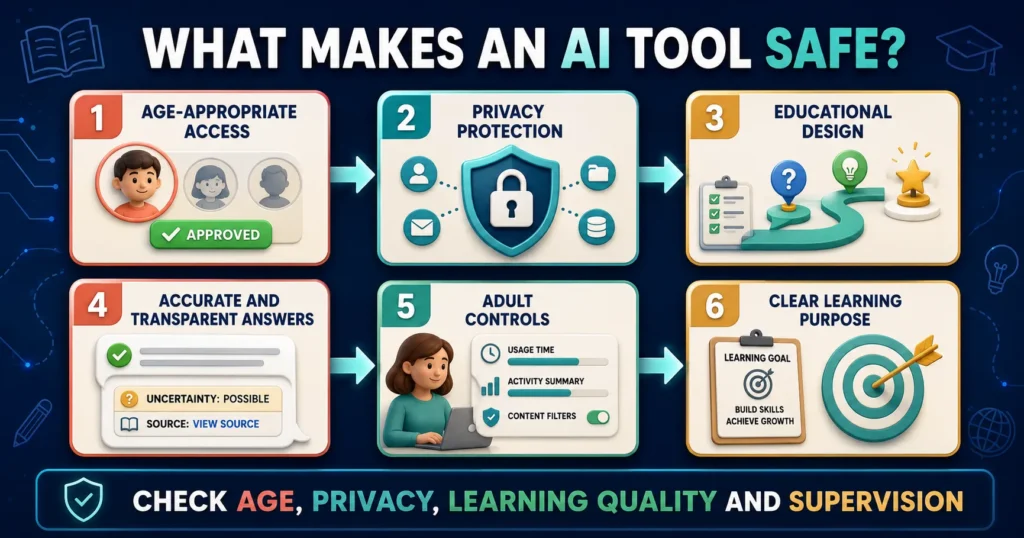
What Makes an AI Tool Safe for Students?
A tool should not be described as safe merely because it blocks some inappropriate requests.
A student-friendly AI platform should be evaluated across several areas.
Age-appropriate access
The service should clearly explain:
- Its minimum age
- Whether parental permission is required
- Whether school-managed access is available
- Which features are restricted for minors
Children should never enter a false birth date to access features intended for older users.
Privacy
Parents and schools should understand:
- What student information is collected
- Whether conversations are stored
- Who can review activity
- Whether information is used to improve models
- How data can be deleted
- Whether the service processes voice, images or uploaded files
Educational design
A useful AI tutor should encourage students to think.
It should ideally provide:
- Hints
- Questions
- Explanations
- Practice
- Feedback
- Opportunities for correction
A tool that immediately produces a finished essay may save time but weaken learning.
Accuracy and transparency
AI tools should not be treated as authorities. Students need to know that answers may be incomplete or incorrect and require verification.
Also, check our guide on How to Keep Children Safe Online: A Practical Parent Guide
Adult controls
Depending on age, helpful controls can include:
- Parent dashboards
- Teacher visibility
- School administration
- Content restrictions
- Activity history
- Safety alerts
- Account-management options
Purpose
The safest tool is often the one designed for the exact task.
A reading-practice platform may be more suitable for a young reader than an open-ended chatbot. A school-managed research tool may be more appropriate for class material than a general consumer application.
1. Khanmigo: Best AI Tutor for Guided Learning
Khanmigo is an AI-powered learning assistant developed by Khan Academy.
Unlike a general chatbot that may immediately provide a completed answer, Khanmigo is designed to guide students through questions and encourage them to reason about the problem.
Students may use it for subjects such as:
- Mathematics
- Science
- History
- Humanities
- Coding
- Writing
- Test preparation
Why Khanmigo is a strong student option
Khanmigo combines AI assistance with Khan Academy’s educational platform. It is designed around tutoring rather than simply generating content.
Its student-safety features include parent or school involvement. Khan Academy states that children’s chat histories and activities can be visible to their parents, guardians, teachers or school administrators, depending on how access was provided.
Parents can also receive alerts for conversations flagged by the safety system. Khan Academy: Khanmigo Safety Features
Age and access
Students under 18 cannot independently purchase learner access. They need access from a parent, guardian or participating school district.
Direct parent or learner subscription access may be limited by location and billing eligibility. Khan Academy’s official information currently says parent and learner subscriptions require an adult account and may be restricted to the United States. School-provided availability can differ. Khan Academy: Meet Khanmigo
Best for
- Students who need guided explanations
- Parents who want visibility into AI conversations
- Schools already using Khan Academy
- Learners who tend to ask AI for final answers
- Mathematics and science practice
Limitations
- Availability varies by country and school
- Some access requires payment
- AI-generated guidance may still contain errors
- Parent visibility may not suit every older student’s privacy expectations
- It does not replace a qualified teacher
Safety verdict
Khanmigo is one of the strongest choices for supervised tutoring because it was created specifically for education and provides adult oversight for minors.
2. ChatGPT Study Mode: Best for Flexible Homework Guidance
ChatGPT is a general AI assistant developed by OpenAI. Its Study Mode is designed for learning, homework assistance and test preparation.
Study Mode can:
- Ask questions
- Explain concepts step by step
- Adjust explanations
- Create practice
- Guide problem-solving
- Check understanding
Students can provide their grade level, topic and preferred learning style.
For example:
“I am in grade eight and learning linear equations. Do not give me the final answer. Ask questions that help me solve the problem.”
Why ChatGPT can help students
ChatGPT supports many subjects and allows follow-up questions. A student can request a simpler explanation, an analogy, a quiz or feedback on their own reasoning.
OpenAI says Study Mode is especially useful for homework, test preparation and learning new topics. It also acknowledges that the feature may behave inconsistently and make mistakes. OpenAI: ChatGPT Study Mode
Age requirements
Under OpenAI’s current general terms:
- Users must be at least 13—or the minimum age required in their country.
- Users under 18 require permission from a parent or legal guardian.
- Children below the minimum age should not create or independently use personal ChatGPT accounts.
Parents should confirm the current requirements before use.
Best for
- Teenagers who meet the age requirement
- Step-by-step explanations
- Practice questions
- Language learning
- Brainstorming
- Feedback on student-created drafts
- General study planning
Limitations
ChatGPT can:
- Provide false information
- Invent citations
- Make calculation mistakes
- Misunderstand the curriculum
- Complete work students should do independently
- Produce answers that sound more certain than the evidence allows
Students should never submit ChatGPT output unchanged or rely on it as their only source.
Safety verdict
ChatGPT Study Mode can be a useful learning assistant for eligible teenagers when parents approve, the school permits it and the student verifies important information.
It is not the best independent option for young children.
3. Microsoft Reading Coach: Best for Reading Fluency
Microsoft Reading Coach is an AI-powered tool designed to help learners practise reading.
It listens while a student reads aloud and provides personalized practice based on words the student finds difficult. Students can read provided passages, use other suitable text or create stories with AI.
Microsoft describes Reading Coach as a free tool that provides personalized reading-fluency practice at school or home. Microsoft Reading Coach
What students can practise
Reading Coach can support:
- Pronunciation
- Reading fluency
- Difficult words
- Syllable practice
- Reading confidence
- Progress tracking
- Multilingual reading practice
- AI-generated story activities
Why it may be safer than a general chatbot
Reading Coach has a defined educational purpose. It is not mainly designed for open-ended conversation or completing assignments.
Its narrow focus can make it easier for parents and teachers to understand what the child is doing.
Data considerations
The tool uses the device’s microphone to evaluate reading. Parents and schools should review microphone permissions, account settings and which activity information may be visible to educators.
Microsoft explains that teachers do not automatically see all independent Reading Coach activity. When students participate in teacher-assigned custom practice, specific progress information may be shared with the educator. Microsoft: Learner Transparency
Best for
- Early or developing readers
- Students working on pronunciation
- Multilingual learners
- Independent reading practice
- Parents seeking a focused rather than general AI tool
Limitations
- It requires microphone access for spoken practice
- AI feedback may not understand every accent or speech difference perfectly
- It is not a replacement for a reading teacher or specialist
- Children with speech, hearing or learning differences may need individualized support
Safety verdict
Reading Coach is one of the best focused AI tools for reading practice. Parents should supervise account setup and understand how voice and progress information are handled.
4. Gemini for Google Workspace for Education: Best School-Managed Option
Gemini is Google’s generative AI assistant. Students may encounter it through personal, parent-supervised or school-managed Google accounts.
For classroom use, Gemini through Google Workspace for Education is generally preferable to an unmanaged personal account because the school controls availability and administration.
Google states that Gemini Apps used with a Google Workspace for Education account include enterprise-grade security and privacy. It also says chats and uploaded files from these education accounts are not reviewed by human reviewers or used to improve generative AI models. Google: Gemini With a School Account
Possible student uses
Students can use Gemini, where enabled, to:
- Explain a topic
- Brainstorm research questions
- Compare ideas
- Create revision material
- Organize notes
- Draft study plans
- Ask questions about uploaded learning material
- Explore examples
Why school-managed access matters
A school-managed environment can provide:
- Administrator control
- Institutional privacy arrangements
- Managed student accounts
- Feature restrictions
- School policies
- Teacher guidance
- Clearer academic expectations
Students should use the account and version approved by their school rather than moving class information to a personal AI account.
Best for
- Schools using Google Workspace for Education
- Students working within an institution’s AI policy
- Classroom research and brainstorming
- Teacher-guided AI-literacy activities
Limitations
- Schools must enable access
- Features may vary by account, age and country
- Gemini can still produce inaccurate information
- Students should not upload confidential information without permission
- Enterprise privacy does not guarantee that every output is appropriate or correct
Safety verdict
Gemini can be a strong option when provided through a school-managed Google Workspace for Education account with clear teacher guidance.
5. Gemini With Family Link: Best Parent-Supervised Google Option
Google also allows eligible children to use Gemini Apps through supervised accounts managed with Family Link.
Google states that a parent must enable Gemini access before a child under 13—or the applicable age in that country—can use it through a supervised account. Google: Guide Your Child’s Gemini Experience
Why parents may consider it
Families already using Android devices and Family Link may prefer to manage AI access within the same Google family system.
Parents can discuss:
- Whether the child is ready
- Which tasks are allowed
- What information must remain private
- How answers will be verified
- How much time the child can spend using AI
Best for
- Families already using Google Family Link
- Eligible children using supervised Google accounts
- Parent-guided explanations and creative activities
- Families wanting centralized Google account supervision
Limitations
- Features and minimum ages vary by country
- Parent enablement does not guarantee every response will be suitable
- Children may misunderstand confident but inaccurate answers
- Families must still review privacy and activity controls
- Gemini should not become a private substitute for a trusted adult
Safety verdict
Family Link makes Gemini more manageable for families, but younger children should still use it alongside a parent. A supervised account is a control mechanism—not proof that independent use is risk-free.
6. Quizlet AI Study Tools: Best for Flashcards and Revision
Quizlet is a study platform known for digital flashcards. Its AI-powered study features can create:
- Practice tests
- Study guides
- Flashcards
- Explanations
- Homework support
- Revision activities
Students can build study material from their own notes or use existing resources. Quizlet AI Study Tools
Why Quizlet is useful
Quizlet is most effective when students use material already connected to their course and actively retrieve answers rather than passively rereading notes.
Its focused study formats may be more useful for revision than asking an open-ended chatbot to teach an entire subject.
Important content warning
Many Quizlet study sets are created by users. A popular flashcard set is not necessarily accurate, complete or aligned with the student’s curriculum.
AI-generated guides and practice questions can also contain errors.
Students should:
- Create sets from teacher-approved notes
- Check definitions against textbooks
- Review AI-generated questions
- Avoid relying on anonymous sets for high-stakes examinations
- Report inappropriate public content
Best for
- Flashcards
- Vocabulary
- Examination revision
- Practice tests
- Active recall
- Students who already have reliable notes
Limitations
- Some features require payment
- Public study sets may contain mistakes
- AI-generated material requires checking
- Availability varies by plan and region
- It can encourage memorization without deeper understanding if used poorly
Safety verdict
Quizlet is a practical revision tool when students use verified class material. It should not be treated as an authoritative source simply because a study set is public or highly viewed.
7. Canva for Education AI Tools: Best for Presentations and Creative Projects
Canva for Education provides design tools for classrooms. Its AI features can help students create:
- Presentations
- Posters
- Infographics
- Videos
- Images
- Diagrams
- Project layouts
- Brainstorming boards
In a teacher-managed educational environment, Canva can help students communicate ideas visually.
Why it can support learning
Creative projects require students to organize information, select evidence and explain ideas to an audience.
AI can assist with initial layouts, image generation or brainstorming, but students should remain responsible for accuracy and design decisions.
Best for
- Presentations
- Posters
- Visual storytelling
- Classroom projects
- Infographics
- Creative collaboration
Important safety considerations
Students should not:
- Generate misleading images and present them as real
- Use another person’s face without consent
- Include private student information
- copy AI-generated facts without checking
- Create humiliating or harmful images
- Assume generated media is free from copyright concerns
- Use AI when the teacher has prohibited it
Access to particular AI features may depend on age, region, school settings and the type of Canva account.
Safety verdict
Canva for Education is useful for teacher-directed creative work. Its safety depends on classroom supervision, appropriate account management and students understanding that AI-generated visuals can be inaccurate or misleading.
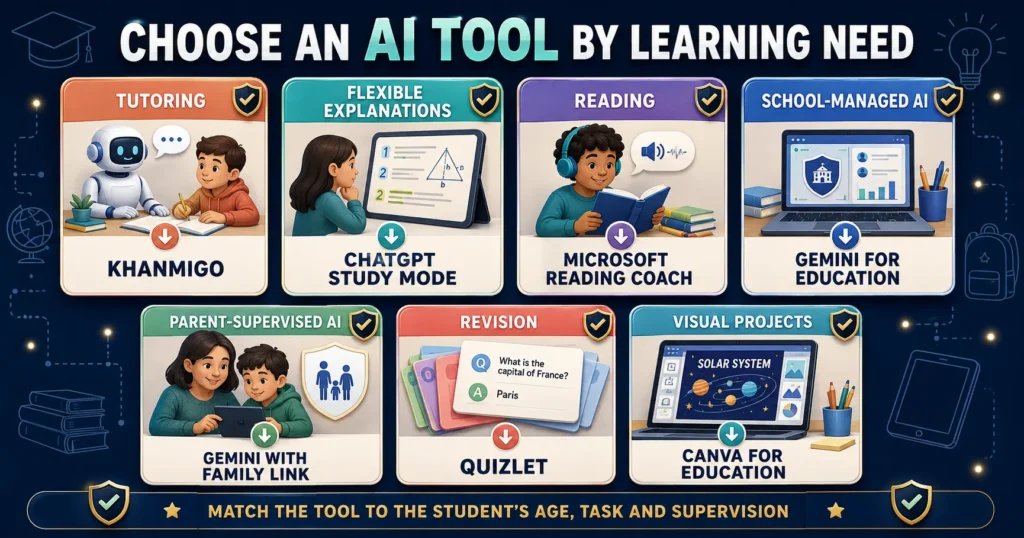
Which AI Tool Is Best for Each Student?
| Student need | Best starting option |
| Guided subject tutoring | Khanmigo |
| Flexible explanations for an eligible teenager | ChatGPT Study Mode |
| Reading and pronunciation practice | Microsoft Reading Coach |
| School-managed generative AI | Gemini for Google Workspace for Education |
| Parent-supervised Google AI access | Gemini with Family Link |
| Flashcards and test revision | Quizlet |
| Presentations and visual assignments | Canva for Education |
The best tool is not necessarily the one with the most features. It is the one that matches the educational task, the student’s age and the level of adult oversight available.
Are Free AI Tools Safe for Students?
A free tool is not automatically unsafe, and a paid tool is not automatically safe.
Parents should ask how a free service is funded and what happens to user information.
Before choosing a free AI tool, check:
- Who operates it?
- Does it publish a privacy policy?
- What is the minimum age?
- Is parental consent required?
- Does it show advertising?
- Does it store conversations?
- Can users delete their information?
- Is student information used to improve models?
- Can unknown users contact the child?
- Does it have reporting tools?
Avoid unknown “free homework AI” websites that request unnecessary personal information, files or account permissions.
AI Tools Students Should Avoid
Students should be cautious about tools that:
- Promise undetectable AI essays
- Advertise automatic cheating
- Create fake citations
- Ask for school passwords
- Request unnecessary identification
- Have no clear company or privacy policy
- Encourage children to upload private photographs
- Allow unrestricted contact with strangers
- Claim every answer is guaranteed correct
- Ask users to disable device security
- Require unofficial downloads
- Imitate a trusted platform’s branding
A polished website does not prove that a service is trustworthy.
How to Check Whether an AI Tool Is Safe
Parents and teachers can use the following process.
1. Confirm the Official Provider
Download the application from the provider’s official website or a trusted app store. Check the developer name carefully.
Fake applications may use similar logos or names.
2. Read the Minimum-Age Requirements
Do not assume every educational tool is intended for young children.
If the minimum age is 13, a parent should not help a younger child create an account by entering a false date.
3. Review the Privacy Policy
Look for information about:
- Student data
- Chat history
- Uploaded files
- Voice recordings
- Model training
- Advertising
- Account deletion
- Third-party sharing
Schools should complete their own privacy and legal review rather than relying only on marketing language.
4. Test the Tool as an Adult
Ask:
- Does it explain uncertainty?
- Can it generate inappropriate material?
- Does it provide final homework answers too easily?
- Are reporting or blocking features available?
- Can a child reach outside links?
- Does it pressure users to upgrade or spend money?
5. Begin With Supervised Use
Sit with the child during the first sessions.
Ask the child to explain:
- What the tool does
- Why they are using it
- What information should remain private
- How they will check the output
- When they should ask an adult for help
6. Review Use Regularly
An approved tool may change its features, privacy policy or business model. Review important settings periodically.
Rules for Students Using AI Safely
Students should follow these basic rules:
- Use only tools approved by a parent, teacher or school.
- Enter the correct age.
- Never share passwords or verification codes.
- Remove personal information from uploaded work.
- Do not upload another student’s information.
- Ask for hints and explanations before final answers.
- Verify facts and citations.
- Follow academic-integrity rules.
- Disclose AI assistance when required.
- Tell an adult about disturbing or unsafe output.
- Do not treat a chatbot as a real friend or qualified professional.
- Remain responsible for the final work.
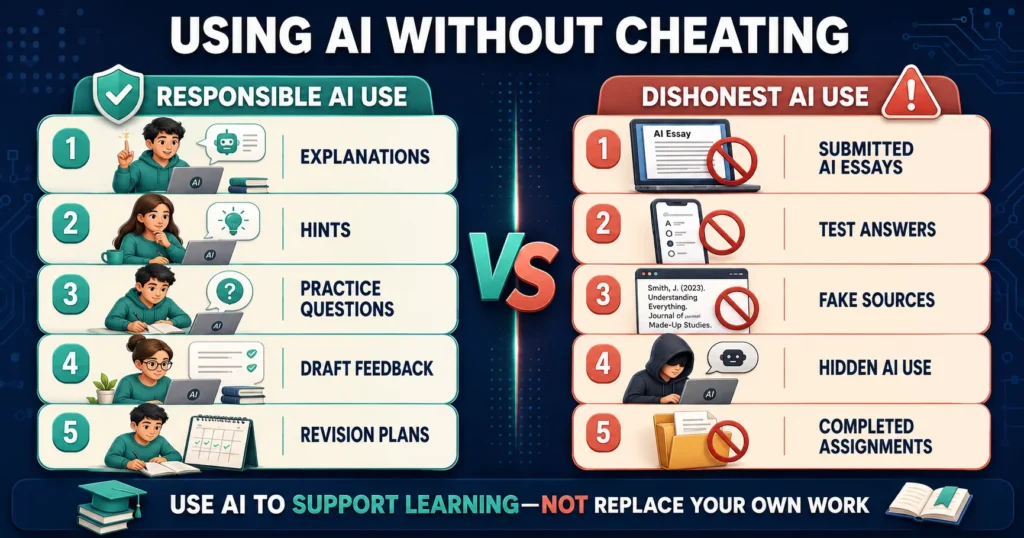
How Students Can Use AI Without Cheating
AI should assist the learning process rather than secretly produce the final submission.
Responsible uses
- Asking for a simpler explanation
- Generating practice questions
- Receiving a hint
- Reviewing the student’s own draft
- Creating a revision schedule
- Practising vocabulary
- Comparing viewpoints
- Identifying topics that need more study
Potentially dishonest uses
- Submitting an AI-written essay
- Generating answers during a prohibited test
- Creating fake sources
- Hiding required AI disclosure
- Rewriting copied work to bypass plagiarism checks
- Completing a graded problem set without understanding it
The teacher’s instructions should always take priority.
Can AI Tools Replace Teachers or Tutors?
No.
AI tools can provide convenient explanations and practice, but they cannot fully replace a teacher’s:
- Professional judgment
- Knowledge of the student
- Understanding of the curriculum
- Classroom observation
- Emotional support
- Safeguarding responsibility
- Ability to identify a learning difficulty
- Real human relationship
Students should speak with a teacher when an AI answer conflicts with class material or when they remain confused.
Safe AI Prompts for Students
For learning a concept
“Explain this topic for my grade level. Use one simple example, then ask me to explain it in my own words.”
For homework guidance
“Do not give me the final answer. Identify where my method went wrong and provide one hint.”
For revision
“Use only the notes I provide to create ten practice questions. Tell me when an answer is not in my notes.”
For writing feedback
“Read my paragraph and identify unclear reasoning. Do not rewrite it for me.”
For fact-checking
“List every factual claim in this response that I should verify. Clearly state anything uncertain.”
For reading practice
“Give me a short passage suitable for my reading level and explain five difficult words after I finish.”
Frequently Asked Questions
What is the safest AI tool for students?
Khanmigo is a strong choice for guided tutoring because minor access involves a parent or participating school and adult dashboards can provide visibility. The safest option still depends on the student’s age and task.
What is the best free AI tool for students?
Microsoft Reading Coach is a strong free option for reading practice. Free availability and features may change, so families should confirm current access.
Can children use ChatGPT?
Children must meet OpenAI’s current minimum-age requirement. Users under 18 require permission from a parent or legal guardian. Younger children should not create independent personal accounts.
Is Khanmigo safer than ChatGPT for children?
Khanmigo is designed specifically for education and provides parent or school oversight for minors. This may make it a more appropriate tutoring option for many school-age children. ChatGPT is broader and better suited to eligible teenagers with guidance.
Is Gemini safe for students?
Gemini can be a more manageable option when used through a school-managed Google Workspace for Education account or an eligible Family Link-supervised account. It can still produce incorrect or unsuitable output.
Can AI tools do students’ homework?
Many tools can generate answers, but students should use AI for explanations, hints and practice. Submitting AI-generated work may violate school rules and reduce learning.
Do AI tools collect student data?
Data practices differ. Some tools store conversations, uploaded files, voice activity or progress information. Parents and schools should review the current privacy policy before use.
Can students trust AI-generated sources?
No. AI may invent or misrepresent citations. Every source should be opened and verified through its original publisher or a reliable database.
Should students disclose AI use?
Students should follow their school’s policy. If AI materially contributed to the work, disclosure may be required even when its use was allowed.
Are paid AI tools safer than free tools?
Not necessarily. Safety depends on privacy practices, age rules, educational design, supervision and accuracy—not price alone.
Can primary-school students use AI tools?
They should use only age-appropriate tools through parent- or school-managed access. Focused tools such as Reading Coach may be more suitable than independent access to a general chatbot.
What personal information should students never enter?
Students should avoid entering passwords, addresses, identification documents, medical details, private photographs, school records and another person’s confidential information.
Final Verdict: What Are the Best Safe AI Tools for Students?
The best option depends on the student’s age and goal.
- Khanmigo is the strongest guided tutoring option where available.
- ChatGPT Study Mode offers flexible homework support for eligible teenagers.
- Microsoft Reading Coach is an excellent focused choice for reading fluency.
- Gemini for Education is useful when a school manages access.
- Gemini with Family Link offers parent-supervised access for eligible children.
- Quizlet is helpful for revision using verified notes.
- Canva for Education supports visual and creative assignments.
None of these platforms should be described as completely safe or always accurate.
The safest use combines:
- The correct age and account type
- Parent or school approval
- Minimal personal information
- Clear educational purpose
- Human supervision
- Fact-checking
- Honest disclosure
- Continued independent thinking
A useful AI tool should help students ask better questions and understand more. It should not remove the effort through which learning happens.
Editorial Note
AI products, prices, age requirements and privacy policies change frequently. This article reflects official provider information available in August 2026. Parents and schools should verify current requirements before approving a tool.
“Safe” in this article means that a tool provides useful educational or supervisory safeguards. It does not mean risk-free, error-free or appropriate for every student.
This article is independent and is not sponsored by or affiliated with any listed company.