
Roblox can be enjoyable and creative for children, but it is not automatically safe simply because its colourful characters look child-friendly.
The platform contains millions of user-created games—known on Roblox as experiences. Children can play, create, communicate with other users and purchase virtual items using Robux. This variety is part of Roblox’s appeal, but it also means the content and level of risk can vary considerably from one experience to another.
So, is Roblox safe for kids?
Roblox can be made safer when parents enter the child’s correct birth date, link a verified parent account, limit communication, select an appropriate content level, control spending and regularly discuss the child’s activity. However, no parental-control system can remove every risk.
Parents should pay particular attention to user-generated content, communication with strangers, scams, in-game purchases, screen time and attempts to move conversations away from Roblox.
This guide explains Roblox in simple terms, outlines its main benefits and risks, and shows parents which safety settings they should review.
What Is Roblox?
Roblox is an online platform where users can play and create digital experiences.
It is sometimes described as a single video game, but it functions more like a large collection of games and virtual spaces made by different creators. These experiences can include:
- Obstacle courses
- Role-playing games
- Racing games
- Building activities
- Simulations
- Adventure games
- Social spaces
- Educational experiences
- Horror-themed games
- Competitive multiplayer games
Children create avatars and can customize them with clothing, accessories and other virtual items. Some items are free, while others require Robux, the platform’s virtual currency.
Because much of the content is created by users rather than by one development team, parents cannot judge the entire platform based on one game their child plays.
What Is the Roblox Age Rating?
Roblox does not have one simple age recommendation that describes every experience available on the platform.
The Entertainment Software Rating Board currently gives Roblox an overall T for Teen rating. It also lists:
- Diverse Content: Discretion Advised
- Users Interact
- In-Game Purchases
- In-Game Purchases Includes Random Items
“Diverse Content: Discretion Advised” means that the platform provides access to a variety of content and that some of it may not be appropriate for every age. “Users Interact” informs parents that players may communicate with one another. ESRB Roblox Parent Guide
This overall rating does not mean that every Roblox experience is intended only for teenagers. Roblox provides content controls designed to limit which experiences younger users can enter.
Parents should examine both the platform-level rating and the content level of each individual experience.
Is Roblox Appropriate for Children Under 13?
Roblox allows children under 13 to use the platform, and it provides age-based protections and parental controls. However, a child’s age alone does not determine whether Roblox is appropriate.
Parents should also consider whether the child can:
- Follow online-safety rules
- Avoid sharing personal information
- Recognize suspicious behaviour
- Leave an uncomfortable conversation
- Ask an adult for help
- Stop playing at an agreed time
- Understand that Robux represents real money
- Cope with competitive or frightening content
A younger child may use Roblox more safely with close parental involvement, restricted communication and carefully selected experiences. An older child who ignores safety rules may require stronger supervision.
The safest approach is not to give a young child an unrestricted account and assume the default settings will meet the family’s needs.
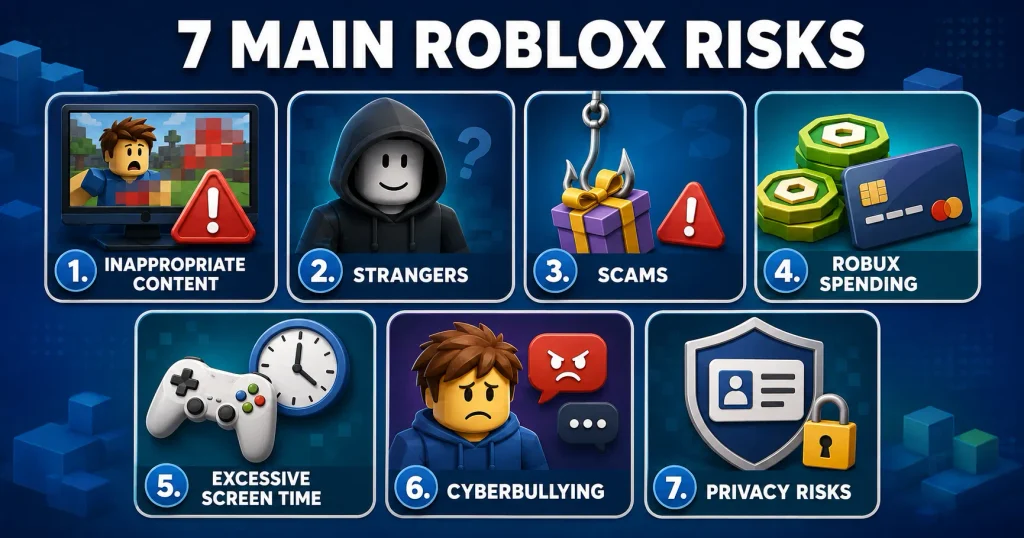
What Are the Main Risks of Roblox?
The most important risks come from the platform’s combination of user-generated content, social interaction and in-game spending.
1. Inappropriate or Frightening Content
Roblox experiences can differ widely. Some are simple and suitable for younger children, while others may include fear, violence, crude humour, gambling-like mechanics or mature themes.
Roblox uses content labels, automated moderation, human review and user reports. However, no moderation system is perfect. Unsuitable content may occasionally appear before it is removed.
Parents can reduce the risk by:
- Setting an appropriate content-maturity level
- Blocking specific experiences
- Checking the child’s most-played games
- Playing new games together initially
- Asking how a game makes the child feel
- Reporting content that appears to violate platform rules
Do not approve a game only because its thumbnail looks harmless. Search for the experience by its exact name and review its description, content label and communication features.
2. Communication With Strangers
Some Roblox experiences allow users to interact with other players.
Not every unknown player is dangerous. Many are simply other children participating in the same game. However, a child cannot reliably know another user’s real identity or age from an avatar and username.
Unsafe users may attempt to:
- Ask for a child’s name or age
- Request photographs
- Ask where the child lives or attends school
- Move the conversation to another application
- Offer free Robux
- Pressure the child to keep secrets
- Send sexual, threatening or manipulative messages
- Build trust over time before making an inappropriate request
Parents should teach children never to share personal information and never to move a conversation to Discord, WhatsApp, Snapchat, Instagram or another platform simply because a Roblox user requests it.
A child should tell a trusted adult if another user asks for secrecy, private images, money or personal contact.
3. Scams and Account Theft
Roblox scams often promise free Robux, rare items, account upgrades or special access.
A scammer may ask a child to:
- Visit an external website
- Enter a password
- Share a verification code
- Download a file
- Complete a fake survey
- Click a suspicious link
- Trade an item unfairly
- Give temporary access to the account
Teach children that legitimate Roblox staff should not ask them to share their passwords or verification codes.
Roblox account security should include:
- A unique password
- A verified parent email where appropriate
- Two-step verification
- No password sharing with friends
- No login through unofficial websites
- Updated devices and applications
If a child sees an offer that appears too good to be true, they should ask a parent before clicking.
4. In-Game Purchases and Robux
Roblox is free to download and play, but many experiences encourage players to purchase Robux or spend it on virtual items, private servers, game benefits and avatar accessories.
Young children may not fully understand that virtual currency represents real money. A small purchase can also feel less significant when the price is displayed in Robux rather than the family’s local currency.
Parents can:
- Avoid saving payment information on the child’s device
- Require approval for every purchase
- Set a monthly spending limit
- Enable transaction notifications
- Explain the real cost of Robux
- Discuss advertising and sales pressure
- Review subscriptions
- Check whether a purchase includes a random item
According to Roblox, linked parents can establish monthly spending limits and receive transaction or high-spending notifications. Gift-card redemption may not be covered by the same monthly limit, so gift-card use should also be discussed. Roblox Parental Controls
5. Excessive Screen Time
Roblox experiences can have no natural ending. A child may finish one round and immediately begin another.
Daily rewards, events and social pressure can make children feel they must remain online or return frequently.
Parents should consider whether Roblox is interfering with:
- Sleep
- Homework
- Physical activity
- Family meals
- Offline friendships
- Responsibilities
- Other hobbies
Roblox allows linked parents to view screen-time information, see a seven-day average and set a daily limit. Roblox Screen-Time Controls
A timer is useful, but children also benefit from warnings and a chance to finish a game round before access ends.
6. Cyberbullying and Unkind Behaviour
Children may experience insults, exclusion, threats, harassment or deliberate disruption during multiplayer experiences.
Cyberbullying can continue beyond one game through messages, group activity or another platform.
Teach children to:
- Avoid responding aggressively
- Leave the experience
- Block the user
- Report the behaviour
- Save evidence when appropriate
- Tell a trusted adult
Parents should respond calmly when children report a problem. If the child expects immediate blame or a permanent gaming ban, they may hide future incidents.
7. Privacy Risks
A Roblox username should not reveal the child’s real name, birth year, school, location or another identifying detail.
Children should avoid discussing:
- Their full name
- Address
- School
- Phone number
- Email address
- Daily schedule
- Live location
- Family travel
- Passwords
- Photographs
- Financial information
Parents should also review visibility settings to control who can see the child’s online status or the experience they are currently playing.
What Safety Features Does Roblox Provide?
Roblox provides several tools that can reduce risk when configured correctly.
These controls may change as the platform updates, so parents should review the official Roblox help pages periodically.
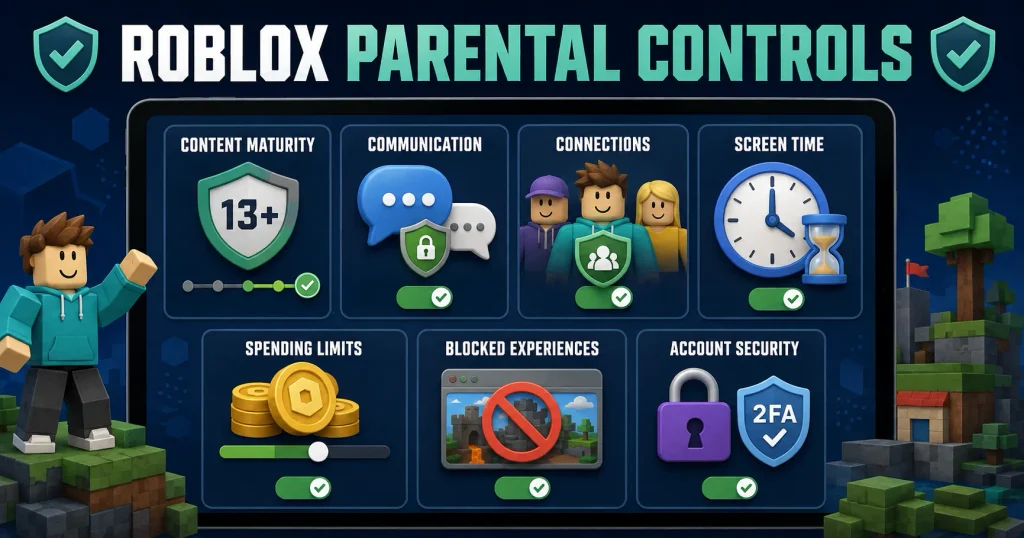
Linked Parent Accounts
Roblox now uses accounts with parent privileges instead of its older parent-PIN system.
A parent creates or uses a separate Roblox account, verifies that they are an adult and links it to the child’s account. The parent can then manage certain settings from their own device.
Roblox says adult verification may use facial age estimation, government-issued identification or a credit card, depending on the region and available method. Parents should use only the official Roblox application or website for this process. Roblox Parental Controls FAQ
Content-Maturity Controls
Parents can choose the maximum content level available to their child and allow or block particular experiences.
Roblox explains that an experience above the selected maturity level may still appear in search or advertising, but the child should not be able to enter it. Roblox Content Maturity FAQ
This distinction is important. A child might still see an image or title for blocked content and ask why it is unavailable.
Communication Controls
Parents can manage how children communicate with other users, depending on the child’s age, account type, region and available features.
For younger children, restricting or disabling direct communication is a sensible starting point. Parents can increase access gradually when the child understands privacy, reporting and safe communication.
Do not assume that a chat filter makes every conversation safe. Children may communicate through coded language or be encouraged to move to another platform.
Connections Management
A linked parent can view the child’s Roblox connections, examine profiles, remove connections, block users and file reports.
Roblox states that a blocked connection cannot directly chat with the child or add the child again without permission. Roblox Parental Controls Overview
Parents should ask children who each connection is rather than assuming that every account belongs to a known school friend.
Screen-Time Controls
The parent dashboard can show a child’s seven-day screen-time average and most-played experiences. Parents can also set daily limits.
Usage information can start useful conversations:
- Which games do you enjoy most?
- Which experience keeps you playing longer than expected?
- Does Roblox interfere with bedtime?
- Is there a game you no longer enjoy but continue opening?
Spending Controls
Parents can set a monthly Roblox spending limit and choose whether to receive purchase notifications.
A very low limit—or a limit of zero where available—is appropriate until the child understands virtual spending and the family agrees on purchase rules.
Platform controls should be combined with device-level purchase approval through Apple, Google, Microsoft, PlayStation or another payment provider.
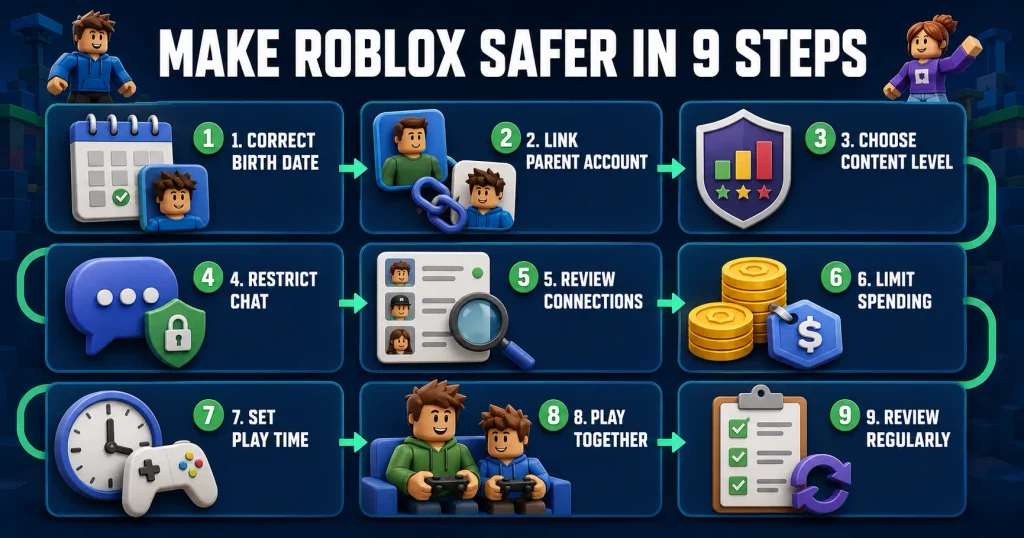
How to Make Roblox Safer for Your Child
Parents can use the following process before allowing regular play.
1. Use the Child’s Correct Birth Date
Do not enter an older age to unlock features.
Age information affects available protections and content. A false age can give a child access to communication or experiences intended for older users.
Roblox allows a linked parent to review or correct a child’s birth date. Roblox Age Settings
2. Create and Link a Parent Account
Use your own Roblox account rather than sharing the child’s password as the main control method.
To link accounts:
- Open the child’s Roblox settings.
- Select Parental Controls.
- Choose Add Parent.
- Follow the official verification instructions.
- Approve the account link.
- Open your parent dashboard and review every available setting.
The exact labels may change, so follow Roblox’s current instructions if your screen looks different. Roblox Account-Linking Guide
3. Select a Suitable Content Level
Choose the lowest reasonable content level for a younger child.
Do not raise the setting only because one requested game is unavailable. Review that game first. If you decide it is appropriate, use the option to allow that specific experience where available instead of increasing access to every experience at a higher level.
4. Restrict Communication
For a young child, begin with communication disabled or limited to approved connections where the platform allows it.
If communication is enabled, teach the child:
- An avatar is not proof of identity
- Personal information stays private
- Unknown links should not be opened
- Conversations should remain on approved platforms
- Requests for secrecy should be reported
- Blocking another user is acceptable
- Uncomfortable interactions should be shown to an adult
5. Review the Connections List
Ask your child to identify each connection.
If the child does not know who an account belongs to, review the profile and consider removing it. A username that resembles a classmate’s name does not prove that it is really that person.
6. Set a Spending Limit
Decide whether the child is allowed to buy Robux.
If purchases are allowed:
- Agree on a fixed amount
- Require permission
- Enable notifications
- Review purchases together
- Avoid connecting an unrestricted payment method
- Explain subscriptions and recurring charges
Never punish a child for failing to understand a virtual purchase system that was not explained clearly.
7. Establish a Time Limit
Set a realistic daily or weekly limit for recreational Roblox use.
Agree on what must happen first, such as:
- Homework
- Meals
- Physical activity
- Household responsibilities
- Bedtime preparation
Give warnings before the limit ends and allow the child to save progress where possible.
8. Play Roblox Together
One of the best ways to understand Roblox is to try it.
Ask your child to show you:
- Their avatar
- Favourite experiences
- Connections
- How chat works
- What they buy with Robux
- How they report someone
- What they would do if a stranger asked for personal information
Playing together helps parents recognize risks without treating every part of the platform as dangerous.
9. Review the Account Regularly
Safety settings are not a one-time task.
Review the account:
- After a Roblox update
- When the child begins a new experience
- When a new communication feature appears
- After the child’s birthday
- When spending changes
- When the child reports a problem
- Every few months as a routine check
As children mature, controls can be adjusted gradually.
Recommended Roblox Settings by Age
The following table provides a cautious starting point. Individual children and platform features vary.
| Age | Suggested parent approach |
|---|---|
| Under 7 | Close adult supervision; carefully approved games; communication disabled; no independent purchases |
| 7–9 | Strong content restrictions; limited or disabled communication; approved connections only; spending blocked or tightly limited |
| 10–12 | Linked parent account; restricted content and communication; regular activity reviews; clear spending and time limits |
| 13–15 | Collaborative controls; privacy and direct-chat rules; spending approval; screen-time boundaries; continued parent oversight |
| 16–17 | Greater independence with ongoing conversations, account security, spending rules and support for reporting harmful behaviour |
This is not an official Roblox age table or a guarantee of safety. A child’s maturity, needs and ability to follow rules should guide the final decision.
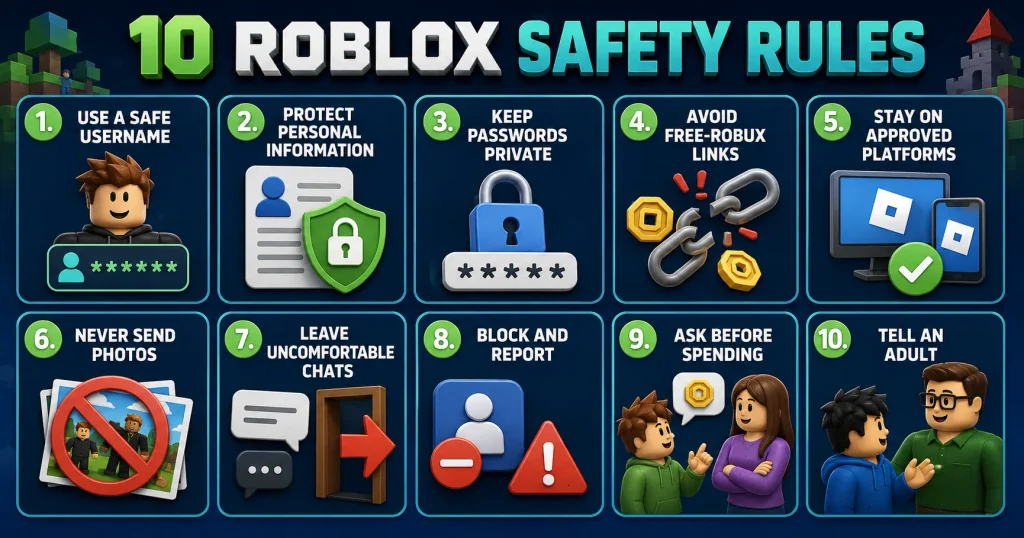
Roblox Safety Rules Children Should Know
Teach children these rules before they begin playing independently:
- Use a username that does not contain your real name.
- Never share your address, school, phone number or location.
- Never share your password or verification code.
- Do not click links offering free Robux.
- Do not move a conversation to another application without permission.
- Do not send photographs to people you meet in a game.
- Leave if a conversation becomes uncomfortable.
- Block and report users who behave inappropriately.
- Ask before spending Robux.
- Tell a trusted adult when something feels wrong.
Ask the child to explain these rules back to you. A child who can repeat a rule may still need practice applying it in a realistic situation.
How to Block Someone on Roblox
The exact appearance of Roblox can change, but blocking generally involves opening the user’s profile or in-experience menu, selecting the relevant options and choosing Block.
Linked parents can also manage a child’s connections through the parent dashboard.
Blocking helps prevent further direct contact, but parents should also report serious behaviour so Roblox can review the account or content.
How to Report Someone on Roblox
Children should report conduct involving:
- Threats
- Bullying
- Sexual messages
- Requests for private images
- Scams
- Hate speech
- Attempts to obtain personal information
- Pressure to move to another platform
- Other violations of Roblox rules
Use the in-experience report option when possible because it can provide Roblox with information about the specific user and incident.
Preserve screenshots or other relevant evidence if the situation involves threats, exploitation or blackmail. Do not redistribute harmful material unnecessarily.
What Should Parents Do After an Unsafe Interaction?
If your child reports something worrying:
- Remain calm.
- Thank the child for telling you.
- Make sure the contact has stopped.
- Block the user.
- Report the account or content.
- Preserve relevant evidence.
- Change passwords if account security is involved.
- Review connected applications and privacy settings.
- Contact appropriate local authorities if there is an immediate threat or suspected exploitation.
Avoid beginning with, “Why did you do that?” A child who fears blame may withhold important details.
Make it clear that an adult’s manipulation, harassment or sexual behaviour is never the child’s fault.
Can Children Be Scammed for Free Robux?
Yes. “Free Robux” offers are a common form of online deception.
Scammers may create fake websites, videos, games or messages that imitate Roblox branding. They may request login details, downloads or personal information.
The safest rule is simple:
Never enter a Roblox password anywhere except the official Roblox application or website.
Parents and children should type the official address themselves rather than using an unfamiliar link.
Roblox promotions, gift cards or rewards should be verified through official sources.
Is Roblox Chat Safe?
Roblox uses moderation and age-related communication controls, but no online chat should be considered completely risk-free.
Filters may reduce some harmful language, yet they cannot always prevent coded messages, manipulation, bullying or attempts to move conversations elsewhere.
For younger children, disable or tightly restrict communication. For older children, combine appropriate settings with education about privacy, blocking and reporting.
Regular conversation is more useful than secretly reading every message without a specific safety concern.
Is Roblox Safe Without Parental Controls?
An unrestricted Roblox account presents avoidable risks, particularly for younger users.
Age-based platform protections may apply automatically, but parents should still review:
- The account birth date
- Content maturity
- Allowed and blocked experiences
- Communication
- Connections
- Visibility
- Private servers
- Screen time
- Spending
- Account security
Default settings may not match the child’s maturity or the family’s expectations.
Is Roblox Educational?
Some Roblox experiences encourage creativity, coding, problem-solving, collaboration or digital design. Roblox also provides tools through which users can build their own experiences.
However, the presence of educational possibilities does not mean every experience is educational or suitable.
Parents should review individual games based on their actual content rather than relying on the Roblox name alone.
Benefits of Roblox for Children
When used appropriately, Roblox may provide:
- Creative play
- Problem-solving
- Digital design experience
- Social play with known friends
- Collaborative challenges
- Interest in coding or game development
- Entertainment
- A shared activity for families
A balanced safety review should acknowledge these benefits while recognizing the platform’s risks.
When Should a Child Stop Using Roblox?
Parents may need to pause or restrict access when:
- The child repeatedly communicates with unsafe users
- Roblox consistently interferes with sleep or school
- The child makes unauthorized purchases
- The child hides accounts or activity
- The child repeatedly accesses unsuitable content
- Gaming causes serious continuing conflict
- The child cannot follow essential safety rules
- The child is being bullied, threatened or exploited
A temporary pause can provide time to secure the account, understand what happened and create a safer plan.
The aim should be to address the specific problem, not simply declare all games harmful.
Frequently Asked Questions
Is Roblox safe for a 7-year-old?
A seven-year-old may use selected Roblox experiences with close adult supervision, strong content restrictions, communication disabled or tightly limited, and no independent purchases. Parents should review each experience first.
Is Roblox safe for a 10-year-old?
Roblox may be appropriate for some ten-year-olds when a linked parent account, content controls, communication limits and clear safety rules are used. Maturity matters as well as age.
Is Roblox safe for teenagers?
Teenagers may face fewer content restrictions but still encounter scams, harassment, inappropriate material and spending pressure. Parents should continue discussing privacy, security and healthy use.
Can strangers talk to children on Roblox?
Communication depends on the child’s age, account type, region and selected settings. Parents should review chat and connection controls rather than assuming communication is automatically disabled.
Can parents disable chat on Roblox?
Roblox provides communication controls through linked parent accounts. Available options can depend on age and region. Parents should select the most restrictive reasonable setting for younger children.
Does Roblox have inappropriate games?
Roblox hosts a wide variety of user-created experiences. Some may contain themes unsuitable for younger children. Content controls reduce access, but parents should still review individual games.
Can children spend real money on Roblox?
Yes. Children can purchase Robux, subscriptions and virtual items when payment is available. Parents can use platform and device controls to restrict purchases and receive notifications.
What is Robux?
Robux is the virtual currency used within Roblox to buy avatar items, access, benefits and other digital content. It can be purchased with real money.
Should parents use their child’s Roblox password?
Parents should create a separate verified parent account and link it to the child’s account. Account sharing can weaken security and is not Roblox’s recommended control method.
What should a child do if someone asks for personal information?
The child should stop responding, leave the experience, block and report the user, and tell a trusted adult immediately.
Is Roblox chat monitored?
Roblox uses moderation systems and communication controls, but moderation cannot guarantee that every unsafe message will be prevented. Children still need privacy, blocking and reporting skills.
Can parents see what their child plays on Roblox?
Linked parents can view screen-time insights and top experiences through parental controls. Available information and controls may depend on the child’s age and account settings.
Final Verdict: Is Roblox Safe for Kids?
Roblox can be reasonably safe for some children when parents actively configure the account, supervise younger players and maintain open communication. It should not be treated as automatically safe or unsuitable solely because of its visual style.
Its main risks include user-created content, communication with unknown people, scams, spending pressure, cyberbullying and excessive use.
Parents can reduce these risks by:
- Using the child’s correct age
- Linking a verified parent account
- Limiting content
- Restricting communication
- Reviewing connections
- Blocking unsuitable experiences
- Setting time and spending limits
- Teaching privacy and scam awareness
- Playing together occasionally
- Responding calmly when children seek help
The question is therefore not only, “Is Roblox safe?” A better question is:
“Which Roblox experiences and features are appropriate for this particular child, and what supervision does the child need?”
No setting can guarantee complete protection. The strongest safety system combines platform controls, parental involvement and a child who knows they can ask for help.
Editorial Note
Roblox features, age rules and parental controls can change. This article reflects official information available in August 2026. Parents should review Roblox’s current help pages and the settings displayed in their region.
This article provides general online-safety information. It is not affiliated with, sponsored by or endorsed by Roblox Corporation.